
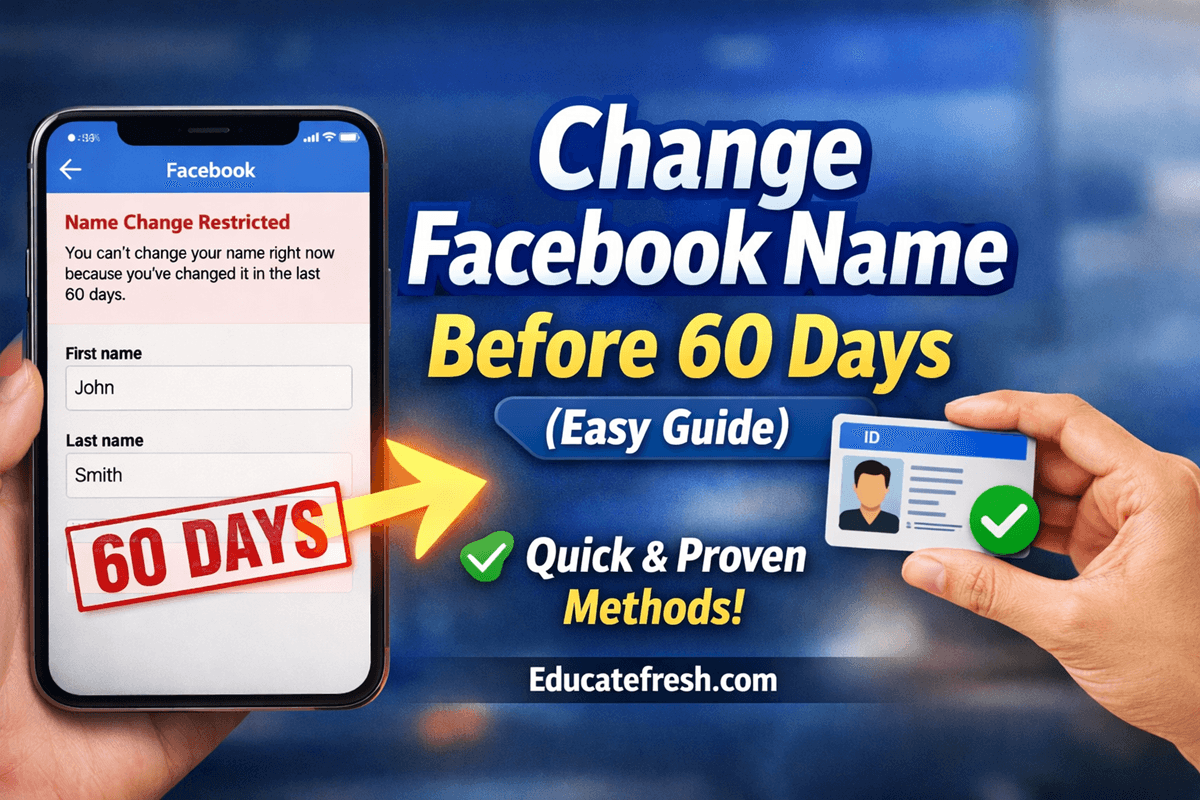
Change Facebook Name Before 60 Days – If you’ve ever tried to edit your name on Facebook and saw the message that you must wait 60 days, you’re not alone. Many users run into this restriction, especially after making a mistake, using a nickname, or trying to align their profile with official documents.
Changing your name on Facebook should be simple—but once you hit the 60-day restriction, it can feel like you’re completely stuck. If you’re here, chances are you’ve tried editing your name and got the frustrating message:
“You can’t change your name right now because you’ve changed it recently.”
I’ve been there. But the good news is that you can change Facebook name before 60 days—and you don’t need any risky tricks or hacks.
In this comprehensive guide, you’ll learn:
- Why does Facebook restrict name changes
- How to change Facebook name before 60 days step-by-step
- Real methods that work
- My personal experience
- Mistakes that can get you blocked
- Advanced FAQs
If you follow this guide carefully, you can successfully update your name without waiting for the 60 days.
Understanding Facebook Name Policy
Before attempting to change your Facebook name before 60 days, you must understand Facebook’s rules. Facebook requires the following;
- Real names only
- No symbols or unusual capitalization
- No impersonation
- No titles like “King”, “CEO”, etc.
Examples
These kinds of names are allowed.
- John Smith
- Miracle Nnabuike
While you cannot use these kinds of names.
- King Miracle
- John Official
- Mr CEO Boss
If your name violates these rules, your request will likely be rejected.
Why Facebook Has a 60-Day Name Change Limit
Before learning how to change Facebook name within 60 days, it’s important to understand the reasoning behind this restriction.
Facebook created this rule to:
- Prevent fake accounts and impersonation
- Reduce scams and misleading identities
- Maintain trust in the platform
- Ensure users use real identities
In simple terms, Facebook wants people to be authentic and consistent. However, they also understand that mistakes happen — which is why exceptions exist.
When You Should Change Your Facebook Name Early
You may need to change Facebook name before 60 days if:
- You made a spelling error
- You used a nickname instead of your real name
- Your name has been changed legally
- You’re using Facebook for business branding
- Your account needs verification
If your reason is genuine, Facebook is more likely to approve your request.
Method 1: Use “Report a Problem” (Most Effective Method)
This is the best and safest way to change Facebook name before 60 days.
Step-by-Step Guide
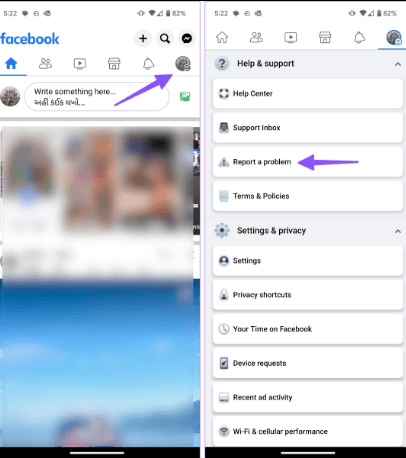
- Open your Facebook app
- Tap the Menu (☰)
- Scroll to Help & Support
- Tap Report a Problem

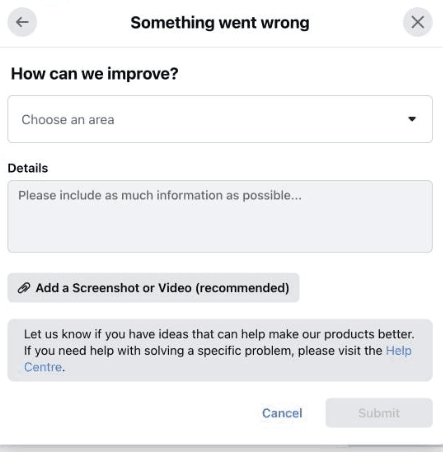
- Select Something Went Wrong
- Describe your issue clearly
- Submit your request
What to Write (Important for Approval)
When trying to change Facebook name within 60 days, your message matters a lot.
Use something like:
“Hello Facebook team, I recently changed my name but realized it does not reflect my real identity. I would like to correct it to match my official documents. Kindly assist me. Thank you.”
Why This Method Works
Now, below is why this method actually works
- It goes directly to Facebook support
- It shows genuine intent
- It avoids triggering security flags
Approval time should be between 24 and 72 hours
ALSO READ: How to Recover Facebook Login When You Forgot Password
Method 2: Use Facebook Name Verification Form
Another powerful way to change Facebook name before 60 days is by submitting your ID.
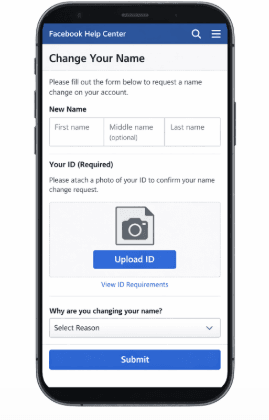
Steps to Follow
- Visit Facebook Help Center
- Search for “Change Name”
- Open the official form
- Upload a valid ID:
- National ID (NIN)
- Driver’s License
- International Passport
- Enter your correct name
- Select the reason for changing your name
- Then tap Submit
Why This Method Works
- Facebook trusts official documents
- It proves authenticity
- It increases approval chances
If your goal is to change Facebook name before 60 days, this method has a very high success rate.
Method 3: Language Change Trick (Optional Method)
This is a lesser-known method that sometimes allows users to bypass the restriction.
Steps
- Go to Settings & Privacy
- Tap Language
- Change to:
- Indonesian
- Tamil
- Return to name settings
- Try editing your name
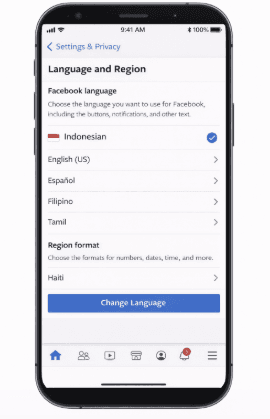
This method is not guaranteed, but some users report success.
My Personal Experience (Real Case Study)
Let me share what happened to me.
At one point, I needed to change my Facebook name before 60 days because I mistakenly used a nickname on my profile. Later, I wanted to use my real name for business and credibility.
When I tried changing it normally, I got the 60-day restriction message.
I felt stuck. Then I discovered the “Report a Problem” method. I wrote a simple, honest message explaining that my name didn’t match my real identity.
Within 48 hours, Facebook responded and allowed me to update my name.
What I Learned
- Facebook actually reviews requests
- Honesty increases approval chances
- Avoid trying to game the system
- Use real names only
Since then, I’ve helped others successfully change Facebook name before 60 days using the same approach.
Best Practices to Get Approved Faster
If you truly want to change Facebook name before 60 days successfully, don’t just follow the methods—follow these best practices carefully.
These are the small details that separate approved requests from rejected ones.
1. Use Your Real Legal Name (No Shortcuts)
This is the most important rule.
Facebook’s system is built to detect:
- Fake names
- Nicknames
- Branded identities
If your name doesn’t look real, your request may be ignored automatically.
What you should do:
- Use the exact name on your ID
- Avoid abbreviations unless they are official
- Keep spelling consistent
2. Match Your Name With Your ID (Critical for Approval)
If you’re using the ID verification method, your name must match exactly. Even small differences can lead to rejection.
What to check:
- Spelling
- Arrangement (First name / Last name)
- Middle names
For example, if your ID says Miracle Onubi Nnabuike, don’t submit Miracle Nnabuike or M. O. Nnabuike. Simply use the full correct version
3. Write a Simple and Honest Explanation
Many people get rejected because they over-explain or sound suspicious. Facebook prefers clear, short, and honest explanations. Just stick to one reason only.
Don’t say “I want to rebrand, change identity, and update my online presence…”, that sounds like a red flag. Say “I mistakenly used a nickname and would like to correct it to match my official identity.”
4. Submit Only One Request (Avoid Spam Behavior)
This is where many people mess up. When you send multiple requests:
- Facebook may flag your account
- Your request may be ignored
- You may delay approval
What to do instead:
- Submit once
- Wait 24–72 hours
- Follow up only if necessary
5. Use a Stable Device and Location
This one is underrated—but very important. If Facebook notices different devices, locations, or suspicious login activity…it may reduce trust in your request.
So use your regular phone, use your usual internet connection, and avoid VPNs during the process.
6. Upload a Clear and Valid ID (If Required)
If you’re submitting ID, don’t upload:
- Blurry images
- Cropped documents
- Fake IDs
Instead, do this;
- Take a clear photo in good lighting
- Show full document edges
- Ensure all text is readable
This alone can determine approval or rejection.
7. Make Your Profile Look Real (Trust Signal Boost)
Before submitting your request, quickly check your profile. Facebook is more likely to approve accounts that look authentic.
Improve your profile by doing the following;
- Adding a real profile picture
- Updating your bio
- Having normal activity (posts, likes)
A “dead” or suspicious account is harder to approve.
Common Mistakes That Lead to Rejection
Avoid these mistakes when trying to change Facebook name before 60 days:
- Using fake or celebrity names
- Adding titles like “Boss”, “King”, or “CEO.”
- Submitting multiple requests repeatedly
- Using inconsistent spellings
- Uploading unclear or fake IDs
These can delay or completely block your request.
Frequently Asked Questions (FAQs)
1. Can I really change Facebook name before 60 days without any problem?
Yes, it is possible to change Facebook name before 60 days, but only under certain conditions. Facebook allows exceptions when the request is genuine — for example, correcting a mistake or matching your real identity. If you follow the proper methods, like reporting a problem or verifying your identity, you can get approval without waiting.
2. What is the fastest way to change Facebook name before 60 days?
The fastest method is using the “Report a Problem” feature. Many users receive approval within 24–72 hours. This method works well because it sends your request directly to Facebook’s support team.
3. Does Facebook always approve name change requests?
No, Facebook does not approve all requests. Approval depends on:
- Your reason for changing the name
- Whether the name looks real
- Your account history
To successfully change Facebook name before 60 days, ensure your request is genuine and matches Facebook’s policies.
4. Can I use a business name on my Facebook profile?
No. Facebook profiles are meant for real individuals. If you want to use a business name, you should create a Facebook Page instead. Trying to use a business name may get your request rejected.
5. Is it safe to upload my ID to Facebook?
Yes, it is generally safe. Facebook uses secure systems to verify identity. Your ID is used only for verification and is not shared publicly.
If your goal is to change Facebook name before 60 days, uploading a valid ID increases your chances significantly.
6. How many times can I change my Facebook name?
Facebook does not specify a strict limit, but frequent changes can trigger restrictions. That’s why it’s important to choose the correct name the first time.
7. What happens if my request to change Facebook name before 60 days is rejected?
If your request is rejected:
- Wait a few days
- Try another method (like ID verification)
- Ensure your name follows Facebook guidelines
Do not spam requests, as this can make things worse.
8. Will my friends be notified when I change my name?
Facebook does not send direct notifications, but your new name will appear on your profile, so your friends may notice the change.
Conclusion
Trying to change Facebook name before 60 days can feel frustrating, but it’s absolutely possible if you follow the right steps, which I have given in this article.
The most effective methods include:
- Reporting a problem
- Verifying your identity
- Using honest explanations
From my experience, the key is simple: be genuine and follow Facebook’s rules. If you apply the strategies in this guide, you should be able to update your name successfully without waiting for 60 days.
Meanwhile, share this post on your social media accounts so that others can learn from it. Also, feel free to use the comment box below for any questions, and Educatefresh will be glad to help.