
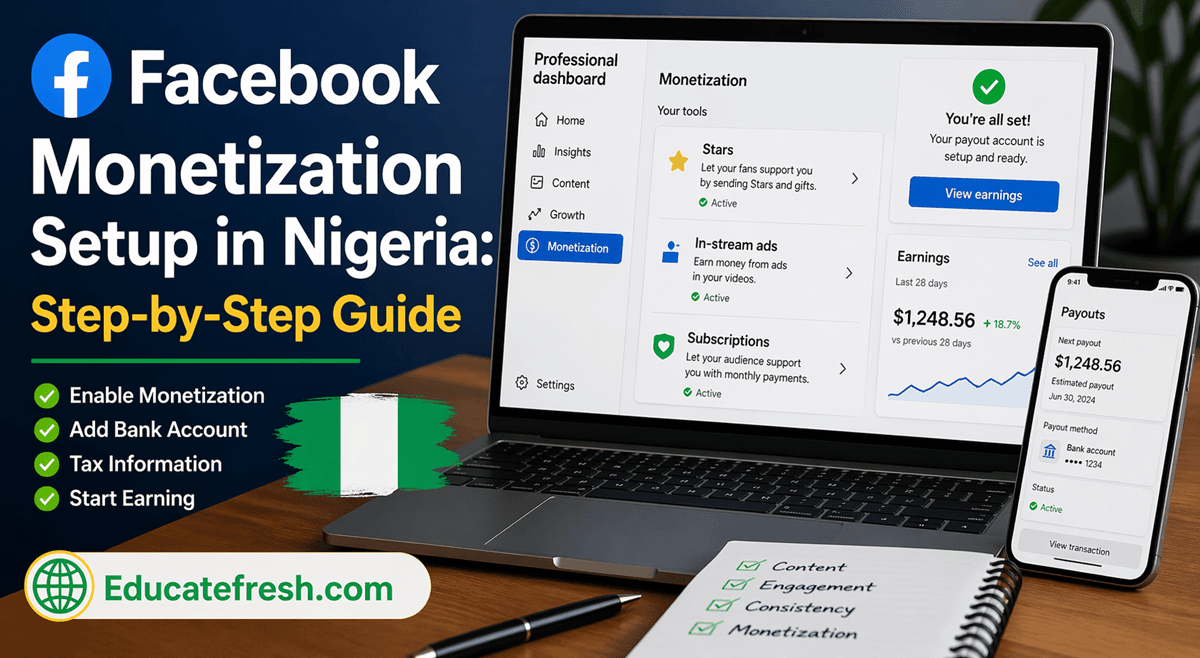
If you’re trying to complete your Facebook monetization setup in Nigeria, one of the biggest questions you may have is: “Do I need Payoneer?” The good news is — you don’t. Facebook now allows many Nigerian creators to receive payments directly into their local bank accounts, making the entire process easier and faster.
However, many people still struggle with the actual process of completing their Facebook monetization setup, especially when it comes to payouts, tax information, and account verification. It’s common to see creators who already have followers, engagement, and even monetization features enabled, yet they are not receiving any money.
This usually happens because one or more important steps were skipped or done incorrectly — such as entering wrong bank details, failing to submit a valid TIN, or not fully activating the payout system. In some cases, users don’t even realize that their earnings are sitting pending or have expired due to an incomplete setup. That’s why understanding the process clearly is very important.
In this guide, you’ll learn exactly how to complete your Facebook monetization setup using a local bank account, avoid common mistakes, and position yourself to start receiving payments without unnecessary delays.
What is Facebook Monetization?
Facebook monetization is the process of earning money from your content on Facebook through tools provided to creators.
You can earn through:
- Facebook Stars
- In-stream ads
- Subscriptions
- Reels monetization
Why Facebook Monetization Setup Matters
Many creators grow their pages but never get paid because they don’t properly complete their Facebook monetization setup in Nigeria.
Common mistakes include:
- Incomplete payout setup
- Wrong bank details
- Skipping tax information
- Ignoring verification steps
Until everything is properly set, your earnings may remain pending or expire.
My Experience With Facebook Monetization Setup in Nigeria
When I first started my Facebook monetization setup, I honestly thought the hardest part would be growing my page. But I was wrong — the real challenge was completing the payout process correctly.
At one point, I had already enabled monetization features and was even seeing activity on my dashboard, but I wasn’t receiving any payments. It was frustrating because I knew the effort I was putting into content creation was real, yet the results were not showing financially.
The major issue came during the payout setup stage. I kept expecting to be asked for Payoneer, based on what I had seen online, but instead, Facebook requested my local bank account details. This confused me at first, and I almost delayed the process because I thought something was wrong.
After carefully completing the steps — adding my bank account, submitting my tax information (TIN), and verifying my identity — everything started to make sense. I realized that many of the guides online were outdated and did not reflect the current process of Facebook monetization setup.
Another challenge I faced was navigating the tax section. At some point, it didn’t even appear properly, which made me think I had done something wrong. But after retrying the process using a different device, I was able to complete it successfully.
The biggest lesson I learned is that most monetization problems are not about eligibility — they are about incomplete setup.
Once I completed everything correctly, I gained confidence knowing that my account was ready to receive payments anytime I started earning consistently.
If you’re currently going through the process, don’t rush it and don’t skip any step. Take your time, follow the correct process, and your Facebook monetization setup will work smoothly.
“If I could go back, I would focus more on completing my Facebook monetization setup early — it saves time and prevents losing earnings.”
Requirements for Facebook Monetization in Nigeria
Before starting your Facebook monetization setup, ensure you meet these Basic Requirements listed below.
- Active Facebook page (not just personal account)
- Consistent posting
- No policy violations
- Growing followers (5,000–10,000 recommended)
- Good engagement
You Can Also Read: How to Earn From Facebook Reels – Step-by-Step Guide
Step-by-Step Facebook Monetization Setup in Nigeria (Using Local Bank Account)
This is the most important part — follow carefully.
Step 1: Open Your Monetization Dashboard
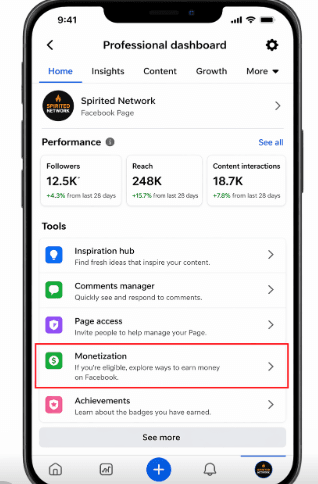
- Open Facebook
- Go to Professional Dashboard
- Click on Monetization
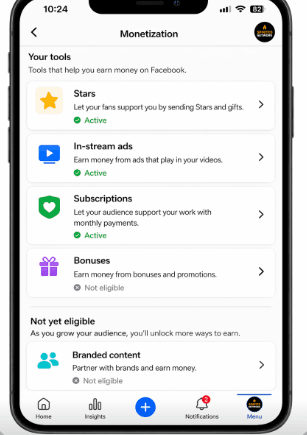
If eligible, you will see:
- Stars
- Ads
- Bonuses

Available monetization options during Facebook monetization setup in Nigeria
Step 2: Begin Facebook Monetization Setup (Payout Setup)
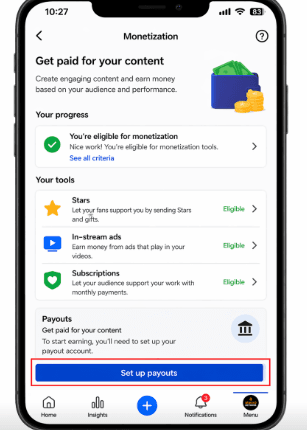
Click on Set Up Payouts.
This is where you connect your earnings to your bank.
Step 3: Add Your Local Bank Account
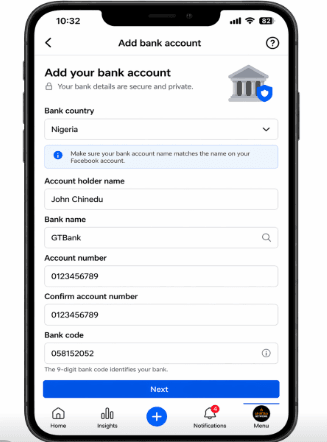
Instead of Payoneer, select Bank Transfer.
You will be required to enter:
- Bank name
- Account number
- Account holder name
Important: Your name must match your Facebook profile.
Step 4: Verify Your Bank Details
Facebook may verify your bank account by:
- Sending a small test deposit
- Requesting confirmation
Make sure your account details are correct to avoid payment issues.
Step 5: Add Tax Information (TIN)
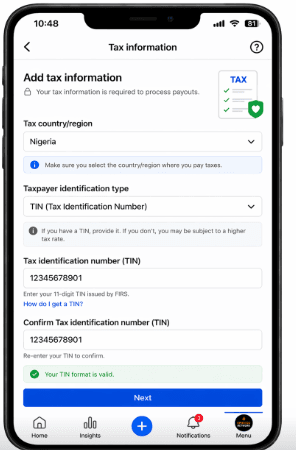
To complete your Facebook monetization setup in Nigeria, you must submit your tax details.
You will be asked for:
- Tax Identification Number (TIN)
- Country
Tax ID = TIN
How to Get TIN in Nigeria
You can get your TIN from:
- Federal Inland Revenue Service (FIRS)
- State tax office
This step is required before Facebook releases your earnings.
Step 6: Identity Verification
Facebook may request:
- National ID
- Driver’s license
- International passport
Ensure that the names match your bank account and the details are accurate
Step 7: Activate Monetization Tools
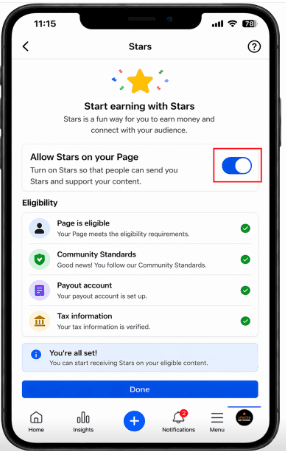
After completing your Facebook monetization setup in Nigeria, you can now turn on Stars, enable ads, and start earning.
Common Problems During Facebook Monetization Setup in Nigeria
1. “Your Earnings Expired” Message
- Cause: Payout setup incomplete
- Solution: Add a bank account, submit tax info, and complete verification
2. Bank Account Not Accepted
- Cause: Wrong details or name mismatch
- Solution: Correct your bank details, and ensure names match
3. Payment Delays
- Cause: Bank processing time
- Solution: Wait for processing, and confirm payout status
4. Tax Section Not Showing
- Cause: Temporary glitch
- Solution: Use a desktop, and switch browsers
Best Content Strategy to Start Earning
Completing your Facebook monetization setup in Nigeria is only the beginning — your content determines your income.
What Works Best
- Inspirational content
- Short videos (Reels)
- Live videos (to earn Stars)
- Real-life stories
Simple Daily Posting Plan
- 2 Reels
- 1 engaging post
- 1 live video weekly
How Much Can You Earn?
Your earnings depend on the audience engagement, content consistency, and monetization tools
Example:
- 1,000 Stars = $10
- 10,000 Stars = $100
Mistakes to Avoid
Avoid the following mistakes when you want to monetize your account.
- Using the wrong bank details
- Skipping tax setup
- Not completing payout
- Posting copyrighted content
- Inconsistent posting
Frequently Asked Questions on Facebook Monetization Setup in Nigeria
1. Can I use my Nigerian bank account for Facebook monetization setup in Nigeria?
Yes, you can use your local Nigerian bank account for your Facebook monetization setup. Facebook now supports direct bank transfers in many regions, so you don’t necessarily need third-party platforms like Payoneer if your bank is accepted.
2. Is Payoneer compulsory for Facebook monetization in Nigeria?
No, Payoneer is not compulsory. While it was commonly used in the past, many users completing their Facebook monetization setup in Nigeria can now receive payments directly into their bank accounts.
3. What is the minimum requirement for Facebook monetization in Nigeria?
To qualify for Facebook monetization setup, you typically need:
- An active Facebook page
- Consistent content
- At least 5,000–10,000 followers (recommended)
- Good engagement
- No policy violations
Specific monetization tools, like in-stream ads, may require higher thresholds.
4. Why is my Facebook monetization not showing?
If monetization options are not showing, it may be because:
- Your page is not eligible yet
- You have low engagement
- Your content violates policies
- Your account is not set to professional mode
Focus on growing your page and posting consistently.
5. Why is my Facebook payout not working in Nigeria?
This usually happens when your Facebook monetization setup in Nigeria is incomplete. Common causes include:
- Missing tax information
- Incorrect bank details
- Unverified identity
- Pending payout setup
Make sure all sections are completed.
6. What is TIN, and is it required?
TIN (Tax Identification Number) is required during your Facebook monetization setup in Nigeria. It is used for tax reporting purposes and must be submitted before Facebook releases your earnings.
7. How can I get a TIN in Nigeria?
You can obtain your TIN from:
- Federal Inland Revenue Service (FIRS)
- State tax office
Some banks also assist in generating TIN during account opening.
8. How long does Facebook take to pay in Nigeria?
After completing your Facebook monetization setup in Nigeria, payments are usually processed within:
- 7 to 30 days after the end of the earning cycle
Delays may occur due to bank processing or verification issues.
9. Can I use someone else’s bank account?
No. Your bank account name must match your Facebook profile name to avoid payment failure.
10. What happens if I don’t complete payout setup?
Your earnings may remain pending or even expire if the setup is not completed on time.
11. Can I change my bank account later?
Yes, you can update your bank details in the payout settings, but delays may occur.
12. Does Facebook deduct tax automatically?
Facebook may apply withholding tax depending on your tax submission, so always provide correct TIN details.
13. Why is my earnings showing but balance is $0?
This usually means:
- Payout setup incomplete
- Payment cycle not completed
- Verification still pending
Conclusion
Completing your Facebook monetization setup in Nigeria using a local bank account is now one of the easiest ways to start earning from your content. You no longer need to rely on third-party platforms like Payoneer if Facebook already supports direct bank payments for your account.
The key is to ensure everything is set up correctly — from your bank details to your tax information and identity verification. Once your Facebook monetization setup is complete, your content can begin generating real income consistently.
Stay consistent, follow the process carefully, and don’t ignore small details — they are what determine whether you get paid or not.
If this guide helped you, share it with others who are trying to complete their Facebook monetization setup and start earning online.