
If you’re trying to recover Facebook without email or phone number, you’re not alone. Many people lose access to their accounts due to forgotten passwords, lost SIM cards, or hacked profiles. In some parts of the world today, this problem is even more common because people often change phone numbers or stop using old email addresses.
For example, you might have registered your Facebook account years ago with a SIM card that is no longer active, or with an email address you no longer remember the password to. When this happens, trying to log in can feel frustrating because Facebook keeps sending verification codes to details you can no longer access.
The situation becomes even more stressful if your account contains important messages, business contacts, or personal memories you don’t want to lose. That’s why learning how to recover Facebook account without email and phone number is not just helpful — it is necessary for many users.
The good news is simple:
You can still recover your Facebook account even without your email or phone number. In this guide, I’ll walk you through proven methods that work, including the exact steps I personally used when I faced this issue.
Why You Lost Access to Your Facebook Account
Losing access to your Facebook account can happen to anyone, and in many cases, it’s not even your fault. If you’re trying to recover Facebook account without email and phone number, understanding the reason behind the problem can help you choose the right recovery method and avoid making the same mistake again.
This issue is very common around the world because people frequently change SIM cards, forget old email passwords, or use temporary details when signing up. Over time, these small actions can lead to a situation where Facebook can no longer verify your identity through the usual login process.
Below are some of the most common reasons people lose access to their Facebook accounts:
1. Forgotten Password
This is the most common issue. You may not have logged into your account for a long time, or you used a password you can no longer remember. Without access to your email or phone number, resetting the password becomes difficult.
2. Lost or Inactive Phone Number
Many users change SIM cards due to network issues, loss, or upgrade. If your Facebook account is linked to that old number, you won’t be able to receive recovery codes.
3. No Access to Email Address
You might have used an email address years ago that you no longer use or remember the password for. Without access to that email, Facebook cannot send recovery instructions.
4. Hacked Facebook Account
If someone gains access to your account, they may change your login details (email, phone number, and password), locking you out completely. In this case, normal recovery methods may not work.
READ THIS: How to Recover Hacked Facebook Account (Step-by-Step guide)
5. Facebook Security Lock
Facebook sometimes locks accounts when it detects unusual activity, such as logging in from a new device or location. While this is meant to protect you, it can also prevent you from accessing your account if you cannot verify your identity.
6. Using Fake or Incomplete Information
If the name or details on your account do not match your real identity, it can make recovery much harder, especially when using ID verification.
What this means for you is that no matter which of these situations you’re facing, the good news is this: You can still recover your Facebook account, even without an email or phone number.
The key is choosing the right method based on your situation — and that’s exactly what the next sections will guide you through step by step.
You Can Also Read: How to Know If Your Facebook Account is Being Monitored
Method 1: Find Your Account Using Your Name
This is usually the first step.
Steps:
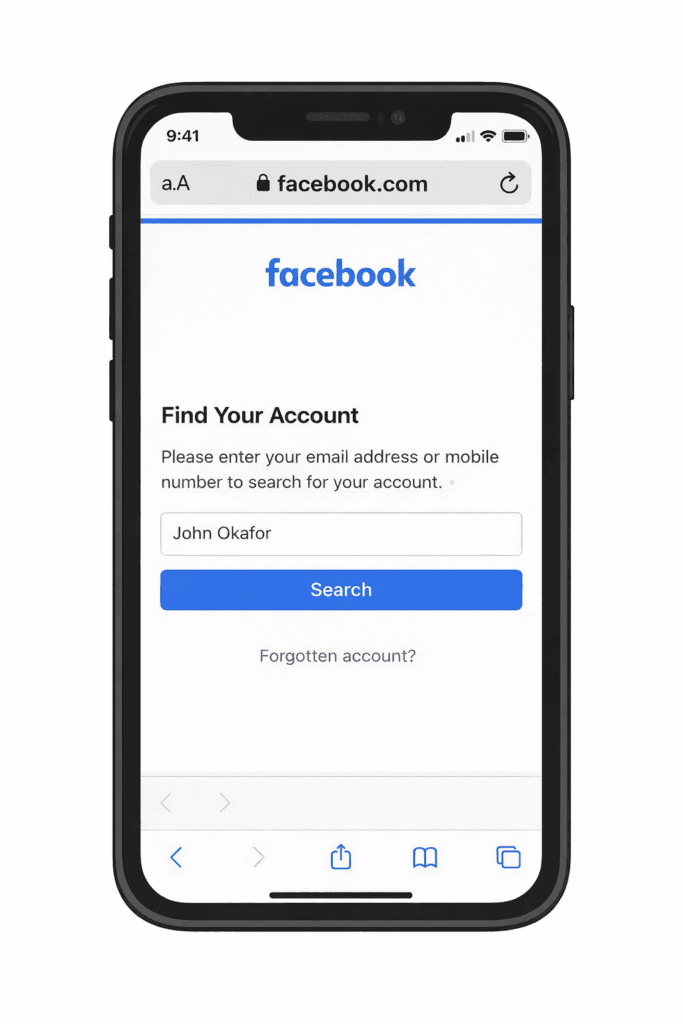
- Go to www.facebook.com/login/identify
- Enter your full name or your username
- Click Search and select your account

What Happens Next?
You may be asked to:
- Identify friends
- Enter an old password
- Confirm a device
Method 2: Verify Your Identity (Most Reliable Method)
If you want to recover Facebook account without email or phone number, this is your best option.
Steps:
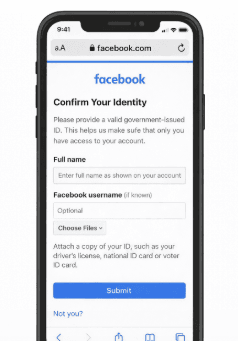
- From your browser, visit www.facebook.com/help/contact/183000765122339
- Enter your details
- Upload a valid ID: National ID, Voter’s card, Driver’s license
- Then submit the form
What Happens Next?
Facebook will:
- Review your ID
- Send a recovery link
- Allow you to reset your password
My Real Experience
I once lost access to my Facebook account after my phone got stolen. The number linked to my account was gone, and I couldn’t access my email either.
At first, it felt like there was no solution.
I tried several methods, but nothing worked until I used the identity verification option. I uploaded my voter’s card and waited.
Within a few days, Facebook sent me a recovery link.
That experience showed me something important: Even when everything seems lost, recovery is still possible if you follow the right process.
Method 3: Use Trusted Contacts
If you had set this before:
Steps:
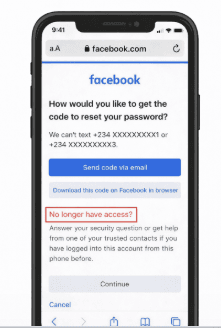
- Click “No longer have access?”
- Add a new email
- Contact trusted friends
- Then enter their codes and continue
Method 4: Use a Previously Logged-In Device
Check:
- Your old phone
- Your browser
If still logged in: Change password immediately
Common Mistakes to Avoid
Avoid these mistakes when it comes to Facebook and recovering your account.
- Creating a new account instead of recovering
- Using a fake identity
- Uploading unclear ID
- Trying too many times
How to Prevent This in the Future
After recovery:
- Add a new phone number
- Add a backup email
- Enable two-factor authentication
- Keep your login details safe
Frequently Asked Questions (FAQs)
1. Can I recover Facebook account without email and phone number?
Yes, it is completely possible to recover Facebook account without email or phone number. Facebook provides alternative recovery options such as identity verification, trusted contacts, and account search using your name or username. The most reliable method is uploading a valid ID so Facebook can confirm your identity and restore your account access.
2. What is the best method to recover a Facebook account?
The fastest method is using the Facebook account recovery page and selecting “Try another way.” However, if you no longer have access to your email or phone number, the quickest and most reliable option is identity verification. Once you submit your ID, Facebook usually responds within a few hours to a few days.
3. How long does Facebook recovery take?
Recovery time depends on the method you use. In most cases:
- Account search recovery → Immediate or within minutes
- Identity verification → 24 to 72 hours
- Trusted contacts → Depends on how fast your friends respond
Delays can happen if your information is unclear or incorrect.
4. Can I recover a hacked account without a phone number?
Yes, you can still recover a hacked Facebook account without access to your email or phone number. In this case, you should use the identity verification method or report the account as compromised. Facebook will review your request and help you regain control after confirming your identity.
5. Why is Facebook not sending me a recovery code?
Facebook may not send a recovery code if:
- Your phone number is no longer active
- Your email is inaccessible
- Your account details have been changed by a hacker
- There are temporary network or system issues
In such situations, you should use alternative recovery options instead of waiting for a code.
6. What should I do if Facebook cannot find my account?
If Facebook cannot find your account, try the following:
- Search using your username instead of your name
- Use an old email address or phone number
- Ask a friend to open your profile and send you the link
- Enter the profile link directly in the recovery page
These methods increase your chances of locating your account.
7. Can I recover my Facebook account without a password?
Yes, you can recover your account without your password by using Facebook’s recovery options. You will be required to verify your identity through alternative methods such as email, phone, or ID verification.
8. What happens if my ID verification is rejected?
If your ID is rejected:
- Make sure the image is clear and not blurry
- Ensure all details are visible
- Try another valid ID
- Ensure your Facebook name matches your ID
You can resubmit the form after correcting the issue.
9. Is it safe to recover Facebook account using these methods?
Yes, it is completely safe as long as you are using official Facebook links. Avoid third-party websites or people claiming they can recover your account, as they may scam you or steal your information.
10. Can I recover my Facebook account if I created it with fake details?
It is much harder to recover an account created with fake details. Facebook may reject your ID if it does not match the account information. In such cases, recovery depends on other methods like trusted contacts or previous login devices.
Conclusion
If you’re trying to recover Facebook without email and phone, don’t panic. There are proven ways to regain access, especially through identity verification. Simply follow the steps given in this article carefully, be patient, and once you recover your account, make sure to secure it properly.
Meanwhile, share this article on your social media accounts so that others can learn from it. And if you have any questions, feel free to use the comment box below.