
In today’s digital world, one of the most powerful things you can do for your business is learn how to make your business appear on Google search. In this article, you’ll learn all you need about making your business appear on Google search. All you need to do is adhere to the basic instructions, and you’ll be good to go.
Every day, billions of people go to Google to search for:
Products
Services
Local businesses
Solutions to their problems
When they search, Google shows them relevant businesses. The question is: Is your business one of them? If your business does not appear on Google, you are missing out on: Free customers, Daily visibility, Credibility, and Sales opportunities
The good news is that learning how to make your business appear on Google search is not complicated. You do not need to be a developer, and you do not need a large budget.
In this guide, you will learn step-by-step how to:
- List your business on Google
- Show up in Google search results
- Appear on Google Maps
- Improve your ranking
- Get more customers from Google
SEE THIS: How to Setup a Google Adsense Account in Nigeria
Why It Is Important to Appear on Google Search
Before diving into the steps, let’s understand why learning how to make your business appear on Google search is so important for businesses of all sizes — whether you are a freelancer, a small business owner, or a global company.
1. Google Is Where Customers Start Their Search
Most people begin their buying journey on Google. They search for things like:
“Best plumber near me”
“Buy a laptop online.”
“Marketing agency in London”
If your business is not visible, you are invisible to potential customers.
2. It Brings Free, Ongoing Traffic
Unlike paid ads that stop when you stop paying, Google search can bring you continuous free traffic. Once your business appears in search results, people can find you every day without ongoing advertising costs.
3. It Builds Trust and Credibility
When your business appears on Google with:
Reviews
Photos
Contact information
It immediately looks more trustworthy and professional.
4. It Increases Sales and Leads
More visibility leads to:
More calls
More messages
More website visits
More sales
5. It Helps You Compete Globally
Even small businesses can compete with large companies on Google by using the right strategies.
The 3 Core Ways to Appear on Google
To fully understand how to make your business appear on Google search, you need to focus on three main areas:
- Google Business Profile
- Website or Landing Page
- Search Engine Optimization (SEO)
Now, let’s explore each in detail.
STEP 1: Create a Google Business Profile
The most important step in learning how to make your business appear on Google search is setting up your Google Business Profile.
This free tool allows your business to show up in:
Google search results
Google Maps
Local listings
What Is Google Business Profile?
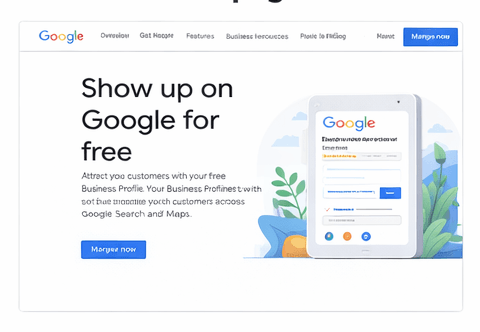
Google Business Profile (formerly Google My Business) is a free listing that displays your business information when people search for your business or related services.
It shows:
Business name
Address
Phone number
Website
Opening hours
Photos
Reviews
Step-by-Step Guide to Creating Your Profile
Step 1: Go to Google Business Profile
Visit:www.google.com/business
Step 2: Sign In with Your Google Account
Use a Gmail account to manage your business.
Step 3: Enter Your Business Name
Type your official business name exactly as you want it to appear.
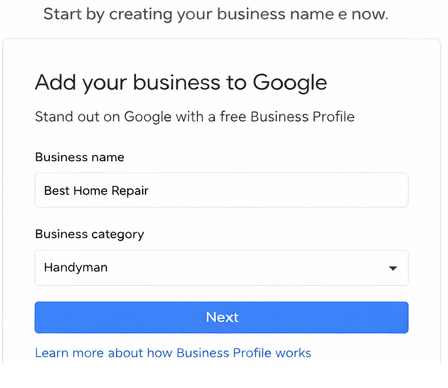
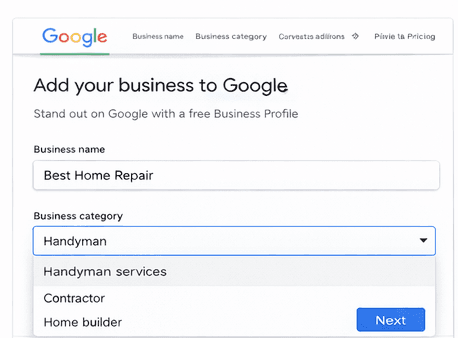
Step 4: Select Your Business Category
Choose a category that best describes what your business does.
Examples:
Restaurant
Clothing store
Consultant
Delivery service
Marketing agency
Step 5: Add Your Business Location
You can:
Add a physical address
ORChoose a service area if you visit customers
Step 6: Add Contact Information
Include:
Phone number
Website URL
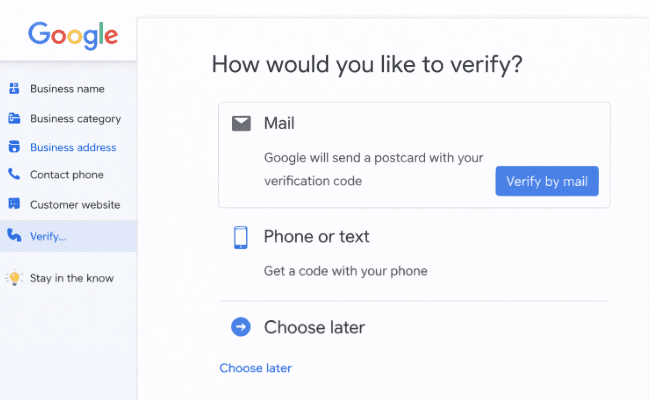
Step 7: Verify Your Business
Google will send a verification code via:
SMS
Email
Phone call
Or postcard
Enter the code to activate your listing.
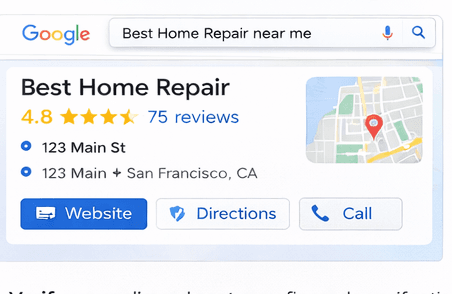
What Your Listing Will Look Like
Once verified, your business will appear on Google with:
A map location
Photos
Reviews
Contact details
This is often the first impression customers will have of your business.
STEP 2: Create a Website or Landing Page
The next step in mastering how to make your business appear on Google search is having a website or landing page.
Why a Website Matters
A website helps Google understand:
What your business offers
Where you operate
Who your customers are
It also gives you more opportunities to appear in search results.
Types of Pages You Can Create
Homepage
Service pages
Product pages
Blog articles
Landing pages
What Your Website Should Include
Your website should clearly show:
Your business name
Your services or products
Your location
Your contact information
Testimonials or reviews
Types of Pages You Can Create
Homepage
Service pages
Product pages
Blog articles
Landing pages
What Your Website Should Include
Your website should clearly show:
Your business name
Your services or products
Your location
Your contact information
Testimonials or reviews
Key SEO Elements
1. Keywords
Use phrases people search for, such as:
“plumbing services near me”
“Buy running shoes online.”
“digital marketing agency”
2. Location Optimization
If you serve a local area, include your location in your content.
Example:
“Professional cleaning services in New York”
3. On-Page SEO
This includes:
Page titles
Headings
Meta descriptions
Image alt text
4. Content Creation
Publishing helpful content improves your visibility.
Example blog topics:
How to choose the right service
Tips related to your industry
Product guides
5. Backlinks
When other websites link to your site, Google sees your business as more credible.
How to Get More Reviews on Google
Reviews are one of the strongest ranking factors. To get reviews:
Ask customers after every purchase
Send them your review link
Make it easy for them
More positive reviews = better ranking.
How to Appear on Google Maps
Once your Google Business Profile is set up and verified, your business will automatically appear on Google Maps. When users search:
- “Restaurant near me”
- “Electrician near me”
Google shows businesses close to them.
How to Rank Higher on Google
To improve your ranking:
- Update your profile regularly
- Add photos frequently
- Respond to customer reviews
- Use relevant keywords
- Keep your information accurate
Use Social Media to Support Your Google Visibility
Google looks at your overall online presence. So you should do the following;
Share your website on social media
Post regularly
Link back to your website
This helps strengthen your SEO.
Advanced Strategies for Faster Results
If you want faster growth:
Publish blog content regularly
Use long-tail keywords
Build backlinks
Optimize for mobile users
Frequently Asked Questions (Expanded)
1. Is it free to list a business on Google?
Yes, creating and managing a Google Business Profile is completely free. You do not need to pay Google to have your business appear in search results or on Google Maps.
The only time you may spend money is if you choose to run Google Ads to promote your business faster. But for basic visibility and organic traffic, you can start and grow without any cost.
2. How long does it take for my business to appear on Google search?
After you complete your Google Business Profile and verify your listing, your business can start appearing within a few hours to a few days. In most cases, it becomes visible within 24–72 hours.
However, ranking higher in search results can take longer, depending on your competition, the quality of your profile, and how well you apply SEO practices like getting reviews, adding photos, and using relevant keywords.
3. Do I need a website for my business to appear on Google?
No, you do not strictly need a website to appear on Google. Your Google Business Profile alone can show your business in search and on Google Maps. However, having a website greatly improves your chances of ranking higher, reaching more people, and providing detailed information about your services.
A website also allows you to create blog posts, product pages, and landing pages that can rank for different keywords.
4. Can I list an online or home-based business?
Yes, you can list an online or home-based business on Google. When creating your profile, you can choose the option that says you deliver services to customers instead of having them visit your location. This is called a service-area business.
You can hide your home address and only show the areas you serve, which is useful for freelancers, consultants, delivery services, and online stores.
5. How do I get my business to appear higher on Google search results?
To rank higher after learning how to make your business appear on Google search, focus on improving your profile and online presence. Key actions include:
Getting more positive customer reviews
Adding high-quality photos regularly
Using relevant keywords in your business description
Keeping your business information accurate and updated
Posting updates or offers on your profile
Linking your website to your profile
The more active and complete your profile is, the better your chances of ranking higher.
6. What kind of photos should I upload to my Google Business Profile?
You should upload clear and high-quality photos that represent your business accurately. This can include:
Exterior and interior of your location
Your products or services
Your team or workspace
Before-and-after results (if applicable)
Photos help build trust and increase engagement. Businesses with photos usually get more clicks and calls than those without.
Conclusion
Now you understand how to make your business appear on Google search and how powerful it can be for your growth.
The process is simple when you break it down:
Create and verify your Google Business Profile
Add accurate business information and photos
Build a simple website or landing page
Apply basic SEO and collect customer reviews
You don’t need to do everything perfectly from the start. The most important thing is to start now and keep improving as you go.
Remember, people are already searching every day for the products and services you offer. When your business is visible on Google, you give those customers a chance to find you, trust you, and choose you. Take the first step today, and let your business begin to show up where your customers are already looking.
If you have any questions, feel free to use the comment box below. Also, share this article on your social media accounts so that others can know about it.