
When it comes to how to use Facebook without data in Nigeria, I’m not just sharing tips—I’ve actually lived through it. There was a time when buying data frequently wasn’t an option for me. Things were tight financially, and as a family man, I had to focus on more urgent responsibilities. But even in that situation, staying connected on Facebook was not something I could completely give up.
There was a time when buying data regularly wasn’t possible for me. As a family man with responsibilities, I had to prioritize essential needs. But completely going offline wasn’t an option, because Facebook had already become more than just social media—it was a business tool, a communication channel, and a source of opportunities.
I needed it to respond to customers, promote my services, and stay visible online. Losing access meant losing income. So instead of quitting, I looked for smarter ways to stay connected while spending almost nothing on data.
That brings us to the real question: Can you still use Facebook without data in 2026?
The honest answer is:
- Not completely free like before
- But you can reduce data usage to almost zero
In this guide, I’ll show you practical, tested methods that actually work in Nigeria today.
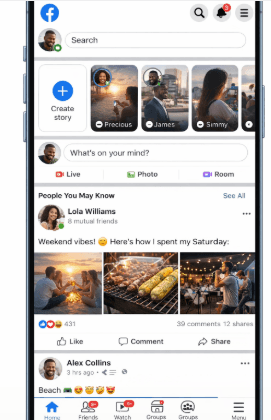
Can You Really Use Facebook Without Data?
Let’s be honest.
- Facebook Free Mode (0.Facebook.com) is no longer widely supported
- Most networks now require at least a small data connection
However, you can still:
- Use Facebook with very little data
- Access text-only versions
- Use free Wi-Fi strategically
- Optimize apps to consume almost nothing
Method 1: Use Facebook Lite (Best Data-Saving Option)
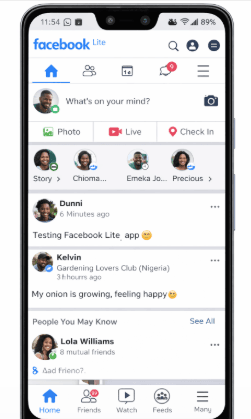
If you’re serious about saving data, this is your best friend.
Why Facebook Lite?
- Uses less than 2MB per session
- Works on slow networks (2G/3G)
- Loads mostly text instead of heavy images/videos
What You Can Do on Facebook Lite:
On Facebook Lite, you can do the following;
- Chat with friends
- Post updates
- Like and comment
- Join groups
- Manage pages
What You Should Avoid:
- Watching videos
- Opening too many images
Method 2: Turn On Facebook Data Saver Mode
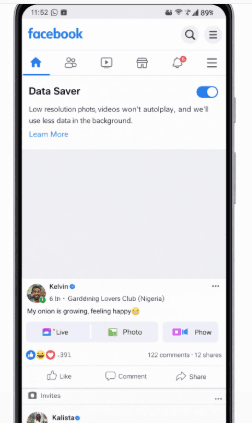
Most people don’t even know this exists.
How to Activate Data Saver:
- Open the Facebook app
- Click the menu (☰)
- Go to Settings & Privacy
- Click Data Saver
- Turn it ON
What Happens After Activation:
- Images load in low quality
- Videos don’t autoplay
- Less background data usage
This alone can reduce your data consumption by 50–70%
You Can Also Read: How to make Money On Facebook In Nigeria (Proven Strategies)
Method 3: Use Text-Only Browsing (Old Trick Still Works Partially)
Even though Free Mode is limited, you can still try.
Simply visit: https://mbasic.facebook.com
Benefits:
- Loads only text and simple images
- Extremely low data usage
- Works on weak networks
My Experience:
I once used this method when I had just ₦50 data left, and I was still able to reply to messages and check notifications.
Method 4: Use Free Wi-Fi Smartly
Let’s be real—this is the closest thing to “free Facebook.”
Where to Find Free Wi-Fi:
- Universities
- Banks
- Cafes
- Hotels
- Some churches and offices
Smart Strategy:
Instead of wasting Wi-Fi time:
- Download messages
- Reply chats
- Schedule posts
- Save videos for offline
Method 5: Turn Off Auto-Play Videos
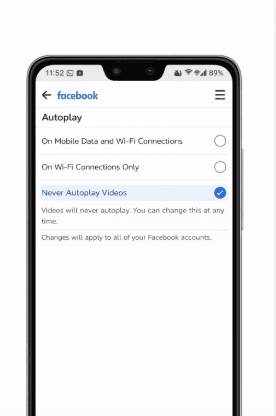
Videos are your biggest data enemy.
How to Disable:
- Go to Facebook Settings
- Find Media & Contacts
- Select Autoplay
- Choose Never Autoplay Videos
Result:
- Saves huge amounts of data
- Makes browsing faster
Method 6: Use Messenger Lite for Chat
If your main goal is chatting, don’t use full Messenger; simply use Messenger Lite
Benefits:
- Uses very little data
- Loads instantly
- Works on a poor network
Method 7: Download Content on Wi-Fi, Use Offline
This is a powerful hack most people ignore.
What You Can Do:
- Save videos
- Take screenshots of posts
- Copy important information
Then view later without data.
Method 8: Use Opera Mini Browser
Opera Mini is built for extreme data saving.
Why It Works:
- Compresses pages before loading
- Blocks heavy elements
- Saves up to 80% data
My Real Experience:
When my data was almost finished, Opera Mini allowed me to browse Facebook longer than normal browsers.
Method 9: Restrict Background Data
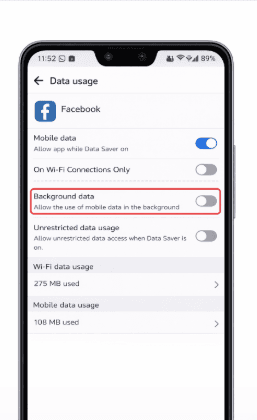
Many apps consume data secretly.
How to Stop It:
- Go to phone Settings
- Click Data Usage
- Select Facebook
- Disable Background Data
Method 10: Use Night Browsing Plans
If you can’t avoid data entirely, reduce cost.
Cheap Options:
- MTN Night Plan
- Airtel Night Plan
- Glo Night Browsing
You can use Facebook heavily at night for a very low cost
Best Combination Strategy (What I Personally Use)
If you want almost “free Facebook,” combine the following;
- Facebook Lite
- Data Saver Mode
- No autoplay videos
- mbasic.facebook.com
- Wi-Fi when available
This reduces your data usage to the bare minimum.
Common Mistakes That Waste Data
Avoid the following mkstakes if you truly want to save data.
- Watching reels
- Streaming videos
- Uploading large images
- Using the full Facebook app
- Leaving the app running in the background
Frequently Asked Questions (FAQs)
1. Can I still use Facebook without data in Nigeria in 2026?
Not completely. The old Facebook Free Mode (0.facebook.com) is no longer widely supported by most Nigerian networks like MTN, Airtel, and Glo. However, you can still use Facebook with very little data by using tools like Facebook Lite, mbasic.facebook.com, and Data Saver mode.
2. What is the cheapest way to use Facebook in Nigeria?
The cheapest method is combining:
- Facebook Lite
- Data Saver Mode
- Turning off autoplay videos
- Browsing via mbasic.facebook.com
This setup can reduce your data usage by up to 80%, making your subscription last much longer.
3. Which app uses the least data for Facebook?
Facebook Lite is currently the best option. It is designed for low data usage and slow networks. Compared to the main Facebook app, it can use 5x less data.
4. How much data does Facebook consume per hour?
It depends on your usage:
- Light use (text + chat): 5MB – 15MB/hour
- Moderate use (images): 20MB – 50MB/hour
- Heavy use (videos/reels): 100MB – 300MB/hour
To save data, avoid videos and stick to text-based browsing.
5. Can I chat on Facebook without data?
No, you need at least a small internet connection. However, using Messenger Lite allows you to chat with very minimal data, sometimes as low as 1MB for multiple messages.
6. Does mbasic.facebook.com still work in 2026?
Yes, it still works and is one of the best options for low-data browsing. It loads a simplified version of Facebook with mostly text, which helps save a lot of data.
7. Why does Facebook consume so much data?
Facebook uses a lot of data because of:
- Auto-playing videos
- High-quality images
- Reels and live streams
- Background app activity
Disabling these features can significantly reduce usage.
8. How do I stop Facebook from consuming data in the background?
You can restrict background data by:
- Go to your phone’s Settings
- Clicking on Apps
- Selecting Facebook
- Turning off Background Data
This prevents Facebook from using data when you’re not actively using it.
My Personal Experience
There was a time I couldn’t afford frequent data subscriptions. I still needed Facebook to communicate, run small business updates, and stay informed.
I tested different methods, and honestly, Facebook Lite + Data Saver saved me. Sometimes, with just a little data, I could stay active for hours, while others complained their data finished quickly. That’s when I realized it’s not just about how much data you have, it’s about how you use it.
Conclusion
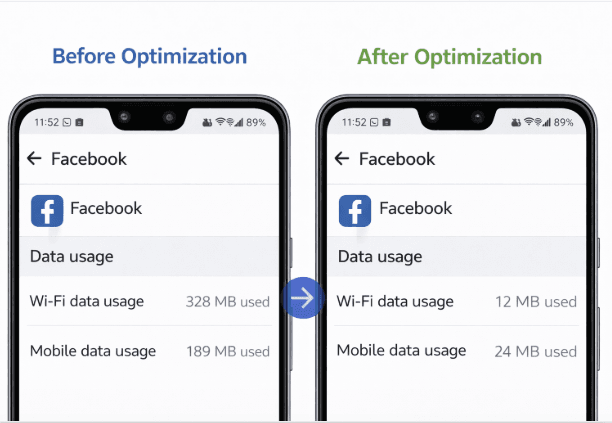
Learning how to use Facebook without data in Nigeria doesn’t mean completely free access anymore—but it does mean using your data wisely. With the right approach—like switching to Facebook Lite, enabling Data Saver, avoiding videos, and using low-data browsing options—you can stay active online without constantly spending money.
From personal experience, these small adjustments make a huge difference, especially during tough financial periods.
Facebook is still a powerful tool for communication, business, and opportunities—even on a tight budget. If you apply these strategies, you’ll notice your data lasting longer almost immediately.
If this article helped you, share it on your social media so others can benefit too. Feel free to use the comment box below for any questions, and Educatefresh will be here to answer you.