
In this comprehensive guide, we’ll walk you through everything you need to know about how to set up Instagram Shopping — from setup and eligibility to advanced sales strategies and analytics. All you have to do is to carefully follow the steps outlined in this article, and you’ll be very much good to go.
Instagram has transformed from a simple photo‑sharing app to a powerful social commerce platform where businesses can showcase, market, and sell products directly to customers. With Instagram Shopping, users can discover products while browsing posts, Reels, Stories, and even Live streams — and convert those views into sales without leaving the app.
Whether you are a small business owner, brand, or creator, mastering Instagram Shopping can boost sales, increase brand visibility, and streamline the customer purchase journey.
In this in-depth guide, you’ll learn:
- What Instagram Shopping is
- Step-by-step setup instructions
- Advanced strategies to increase sales
- Common mistakes to avoid
- Real-life experience insights
- Expanded FAQs
By the end, you’ll be ready to turn your Instagram page into a sales-generating machine.
What Is Instagram Shopping?
Instagram Shopping is a set of features that enables businesses to sell products directly through the Instagram app. Once your shop is approved and your catalog is set up, you can tag products in posts, Stories, Reels, Live, and your Shop tab, allowing users to tap, view product details, and buy almost instantly.
Through product tags and the dedicated Shop tab on your profile, Instagram becomes a mobile storefront where followers can browse your products and interact with your brand — all without leaving the platform.
Instead of sending customers to external websites immediately, Instagram enables:
- Product discovery inside the app
- Product tagging in content
- Easy navigation through the Shop tab
- Seamless purchase journeys
This transforms your profile into a mobile storefront. Once activated, customers can:
- Tap on a product in your post
- View details instantly
- Purchase with minimal steps
The Evolution of Instagram into a Marketplace
When Instagram launched, it was just a photo-sharing app. But today, it has evolved into a full e-commerce ecosystem powered by Meta Platforms.
Key changes include:
- Introduction of Shops
- Integration with Facebook Commerce Manager
- Video commerce via Reels
- Influencer-driven selling
This shift has made Instagram one of the most powerful tools for digital marketing and online sales, especially in regions like Nigeria, where mobile usage is high.
Why Instagram Shopping Matters for Businesses
Instagram Shopping turns your visual content into a shoppable experience, removing friction from the buying process. Here’s why it matters:
1. Seamless Shopping Experience
Users can discover products while scrolling and complete purchases with just a few taps. This reduced friction boosts conversion potential.
2. Product Discovery Everywhere
Products can be tagged in posts, Stories, Reels, and Live streams — increasing visibility and sales opportunities across the app.
3. Professional Brand Presence
A Shop tab on your profile showcases a full catalog, making your brand look professional and credible.
4. Data‑Driven Marketing
Instagram’s analytics help you understand which products and content perform best, so you can refine your strategy for more sales.
Instagram Shopping Eligibility Requirements
Before you learn how to set up Instagram Shopping, you need to meet some requirements.
You must have an Instagram Business Account
Your profile must be linked to a Facebook Page
You must sell physical products (not services)
Products must comply with Instagram’s commerce policies
You must have a product catalog in Facebook Commerce Manager or via a partner platform (e.g., Shopify)
If these are met, you can proceed to set up your shop — and if not, Instagram will notify you of any issues during setup.
Step-by-Step Guide on How to Set Up Instagram Shopping
Here’s a complete setup walkthrough:
1. Switch to a Business Profile
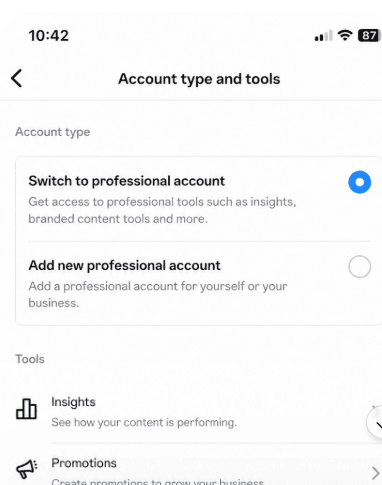
Ensure your Instagram account is a Business Profile (not personal). You can change this in Settings → Account → Switch to Professional Account.
2. Connect to Facebook Page
Link your Instagram Business Profile to a Facebook Page. This connection helps Instagram pull product details from the Facebook catalog and manage your shop seamlessly.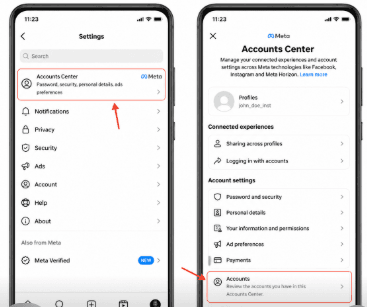
This is a critical step.
- Go to Settings → Accounts Center
- Link your Facebook Page
- Ensure both accounts are properly connected
3. Create a Product Catalog
Using Facebook Commerce Manager or a partner system like Shopify, add your products (name, photos, price, description). Once approved, this catalog becomes the backbone of your Instagram Shop.
Your catalog is your inventory system.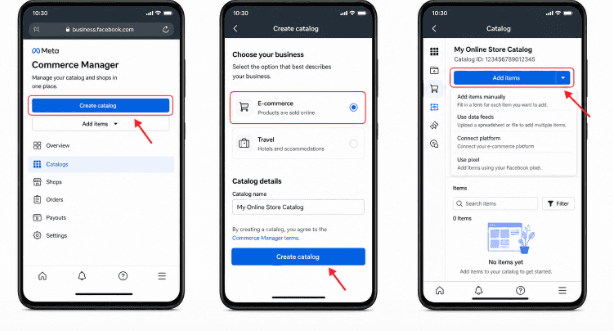
You can create it using:
- Facebook Commerce Manager
- Shopify integration
Add:
- Product name
- Price
- Description
- High-quality images
4. Submit Your Shop for Review
After linking the catalog, submit your account for Instagram Shopping approval. Instagram typically reviews within a few days — but it may take longer depending on the region or compliance checks.
5. Turn On Shopping Tools
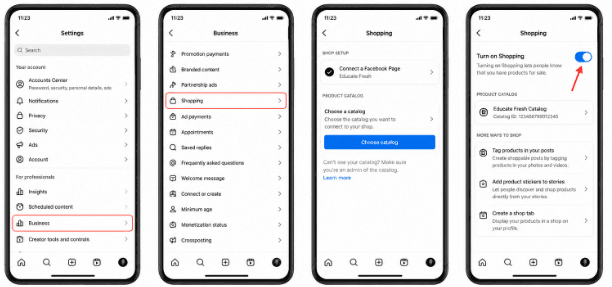
Once approved, go to Settings → Business → Shopping, select your product catalog, and enable shopping functionalities on your account.
Tip: If you don’t see “Shopping” yet, make sure your catalog is correctly set up, and your account meets all eligibility requirements.
READ THIS: Pinterest marketing Explained – Pinterest for Growth & Income
Core Instagram Shopping Features
Once your shop is live, here’s what you can use to sell:
1. Shop Tab
This is your storefront — a dedicated place where followers can browse your products, collections, and promotions without scrolling through posts.
2. Product Tags
Like tagging accounts, you can tag products in posts and content. Users tap the shopping bag icon to view product details.
Up to 5 products per single post
Up to 20 products per carousel
3. Shoppable Stories
Add a product sticker in Stories to tag items — perfect for limited drops, exclusive offers, and new releases.
4. Reels Shopping
Tag products in Reels to merge entertaining video content with shopping opportunities — a powerful way to drive both discovery and sales.
5. Live Shopping
If available in your region, go Live and tag products in real‑time so viewers can purchase directly during your stream
How Instagram Shopping Works for Customers
Users discover and shop your products in multiple ways:
Feed posts with tagged products
Stories with shoppable stickers
Reels with embedded product tags
Shop tab on your profile
Explore tab shopping recommendations
Once they tap a tagged product, they see price, description, and photos — and with Instagram Checkout (where available), they can complete purchases without leaving the app. In other regions, they can be redirected to your website to finish buying.
How to Tag Products in Posts, Stories & Reels
Tagging products is easy once your Shop is approved:
Create a post like usual
Tap “Tag Products” instead of a person
Search and select the product from your catalog
Publish — the shopping bag icon appears instantly
For Stories, use the product sticker and place it anywhere on the image or video. For Reels, product tagging works the same way and links the item shown in the video to its product page.
Optimizing Your Instagram Shop for Sales
Once you understand how to set up Instagram Shopping, the next step is optimizing your shop. Here are strategies to boost visibility and conversions:
1. Curate Themes and Collections
Group products into collections like “Holiday Gifts”, “Best Sellers”, or “New Arrivals” to guide shoppers.
2. Use Engaging Content Formats
Mix feed posts, Reels, Stories, and Live shopping to keep your audience engaged and boost product discovery.
3. Tell a Story Around the Product
Show how products are used — lifestyle photos, tutorials, behind‑the‑scenes, or customer photos build trust and context.
4. Encourage User‑Generated Content (UGC)
Ask customers to tag your products — reposting UGC with product tags adds social proof and increases trust.
5. Limited‑Time Offers
Flash sales, launch countdowns, and story highlights increase urgency and click‑through performance.
Tracking and Analytics for Instagram Shopping
Instagram provides insights into product performance, including:
Product views
Clicks on product tags
Shopping engagements
Saved products
This data helps you understand which products and content formats drive sales so you can refine your marketing strategy.
My Experience with Instagram Shopping
From practical experience in online business and digital marketing, setting up Instagram Shopping is not always as smooth as it sounds—but it is absolutely worth it.
One major challenge many people face is getting approved. Even when everything seems correct, Instagram may delay approval or reject the application. In most cases, the issue is usually:
- Incomplete catalog setup
- Policy violations
- Inconsistent account activity
Another key lesson is this: having Instagram Shopping alone does not guarantee sales.
Many beginners believe that once their shop is active, customers will start buying immediately. That is not true.
What actually drives results is:
- Content quality
- Audience trust
- Consistent posting
- Clear product positioning
For example, businesses that combine:
- Reels
- Testimonials
- Product demonstrations
…tend to perform significantly better than those who just post product images.
Also, in markets like Nigeria, where in-app checkout may not always be available, directing users to WhatsApp or a website becomes very important. This means your sales funnel must be strong beyond Instagram.
Another important insight is that Reels outperform regular posts when it comes to product discovery. If you’re serious about making sales, you should focus heavily on short-form video content.
In summary, Instagram Shopping works best when combined with:
- Good branding
- Smart content strategy
- Customer engagement
Common Challenges and How to Fix Them
Even with setup complete, issues can arise:
Shop Not Showing Up?
Ensure your catalog is connected.
Your account must be in a supported country
Your products must meet Instagram commerce policies
Product Tagging Missing?
Confirm your account is Business and approved for Shopping
Check if your catalog is active and products meet requirements
If problems persist, revisit each setup step or reach out to Meta support.
Frequently Asked Questions (FAQs)
1. How long does Instagram Shopping approval take?
Approval can take anywhere from a few hours to several days. In some cases, it may take longer if additional reviews are required.
2. Can I use Instagram Shopping without a website?
Yes and no. If Instagram Checkout is not available in your country, you will need a website or alternative platform to complete purchases.
3. Why was my Instagram Shopping application rejected?
Common reasons include:
- Policy violations
- Selling restricted products
- Incomplete catalog
- Suspicious account activity
4. Can I sell services using Instagram Shopping?
No. Instagram Shopping is strictly for physical products.
5. How many products can I upload?
You can upload thousands of products, depending on your catalog setup.
6. Is Instagram Shopping free?
Yes, setting up Instagram Shopping is free. However, fees may apply depending on checkout methods.
7. Can creators use Instagram Shopping?
Yes. Creators who sell their own products are eligible.
8. What type of content drives the most sales?
- Reels
- Product demonstrations
- Customer testimonials
9. Do I need many followers to succeed?
No. Even small accounts can generate sales if they have engaged audiences.
10. How do I increase conversions?
- Use clear product images
- Add strong captions
- Include call-to-actions
- Build trust
Conclusion
Instagram Shopping is one of today’s most dynamic ways to sell products and grow your online business. By setting up your shop properly, tagging products in strategic content, leveraging analytics, and engaging customers with compelling posts, you can turn your Instagram profile into a powerful revenue‑driving storefront.
Whether you’re a new brand or scaling your business, mastering Instagram Shopping is essential to staying competitive and providing a seamless, engaging shopping experience for your customers.
I hope you found this How to Set Up Instagram Shopping, feel free to use the comment box below. Also, share this article on your social media accounts so that others can learn from it.