
In this detailed guide, you’ll learn exactly how to use LinkedIn Easy Apply, step by step, with screenshot references, plus practical tips to increase your chances of getting hired. Finding a job online can be stressful, time-consuming, and frustrating—especially when every application requires filling out long forms repeatedly.
LinkedIn introduced Easy Apply to solve this problem by allowing job seekers to apply for jobs directly on LinkedIn in just a few clicks.
With LinkedIn Easy Apply, you can submit your application without leaving LinkedIn, using information already on your profile. This feature has become very popular among recruiters and job seekers alike.
LinkedIn introduced Easy Apply to simplify this entire process and remove the common barriers that discourage job seekers from applying consistently. Instead of repeatedly entering the same information on different company websites, Easy Apply allows applicants to submit their applications directly within LinkedIn using their existing profile details and uploaded resume.
READ THIS: How to Optimize LinkedIn for Job Opportunities
This feature was designed to save time, reduce stress, and make job hunting more efficient—especially for professionals applying to multiple roles. Today, Easy Apply is widely used by recruiters, startups, remote-first companies, and even large organizations looking to streamline their hiring process and reach qualified candidates faster.
What Is LinkedIn Easy Apply?
LinkedIn Easy Apply is a feature that allows job seekers to apply for selected jobs on LinkedIn without being redirected to an external website. Instead of filling out long application forms, LinkedIn automatically uses your profile details and resume.
Key Features:
Apply in minutes
Uses your LinkedIn profile
Resume upload (PDF or DOC)
Simple screening questions
Mobile and desktop friendly
Not all jobs have Easy Apply, but many startups, remote companies, and recruiters prefer it for faster hiring.
Requirements Before Using LinkedIn Easy Apply
Before applying, make sure you have the following ready:
1. A Complete LinkedIn Profile
Recruiters often review your profile after you apply. Ensure you have:
Professional profile photo
Clear headline
Updated work experience
Skills listed
Education details
2. Updated Resume
PDF format recommended
Tailored to the job role
Clear job titles and achievements
3. Active LinkedIn Account
You must be logged in to apply.
Step-by-Step Guide to Using LinkedIn Easy Apply
Follow the steps below to use Easy Apply on LinkedIn
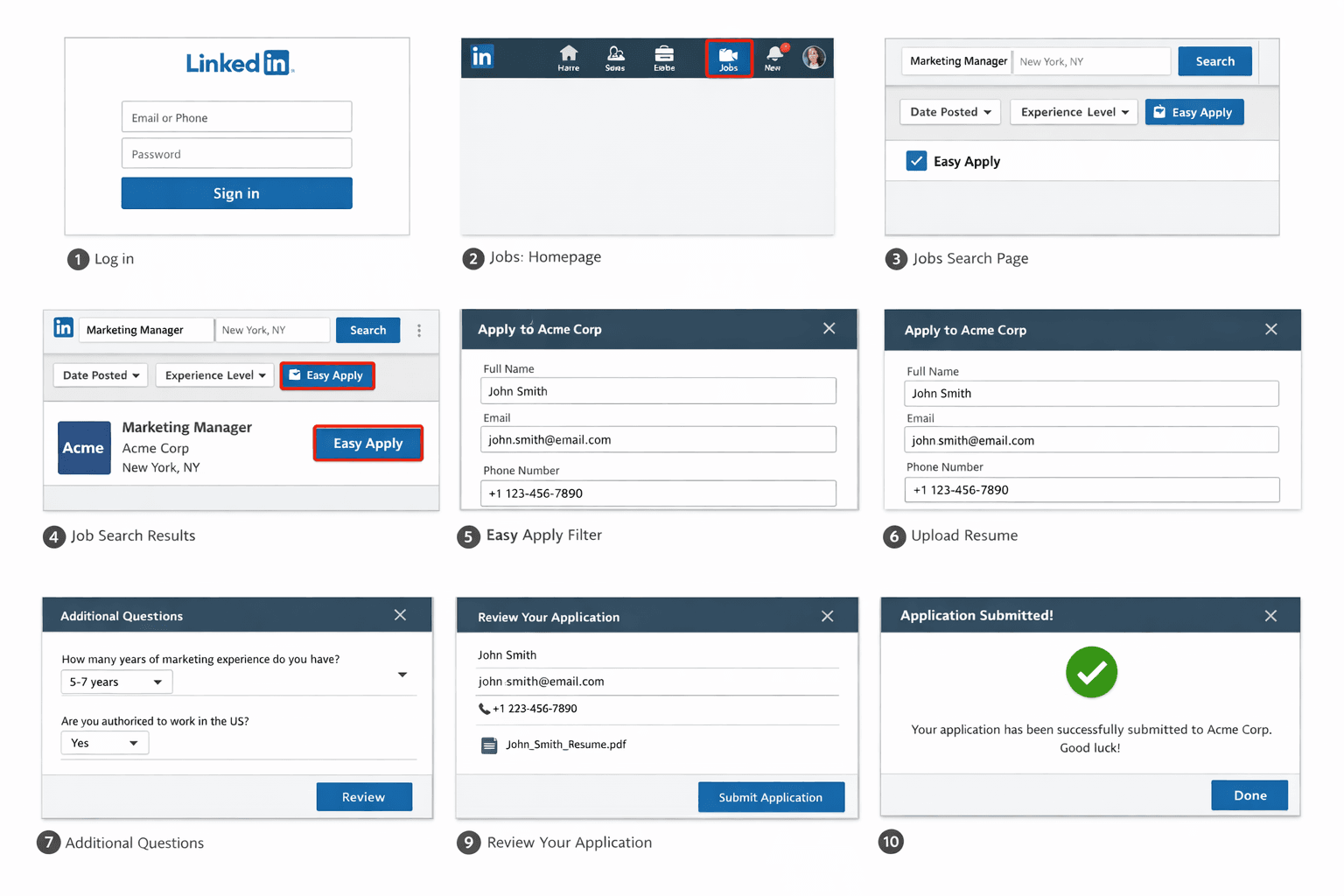
- Go to www.linkedin.com and log in using your email and password.
- Next, go to the Jobs Section at the top of your LinkedIn homepage, and click on the “Jobs” icon.
- Search for a job role. Use the search bar to enter:
Job title (e.g., Digital Marketer, Software Developer)
Location (or “Remote”)
Then Click Search.
On the job results page:
Look for the “Easy Apply” filter at the top
Click it to show only Easy Apply jobs
- Click on any job that interests you. You’ll notice a blue “Easy Apply” button instead of “Apply on company website.
- Click the “Easy Apply” Button. Once you click Easy Apply, a pop-up window will open. LinkedIn will automatically fill in:
Your name
Email
Phone number
You’ll be asked to:
Upload a resume, or
Choose one already uploaded to LinkedIn
Tip: Always upload a resume tailored to the role.
Some employers include short questions such as:
Years of experience
Willingness to relocate
Availability
Work authorization
Answer honestly and clearly.
- Review your application before submitting:
Check your contact details
Confirm resume upload
Review answers
- Submit Your Application by clicking Submit. You’ll see a confirmation message that your application has been sent successfully.
How to Track Your Easy Apply Applications
Go to Jobs
Click My Jobs
Select Applied
Here you can see:
Application status
Date applied
Company name
Tips to Increase Success with LinkedIn Easy Apply
1. Optimize Your Profile for Keywords
Recruiters search using keywords. Match your profile to the job description.
2. Customize Your Resume
Avoid sending the same resume to every job.
3. Apply Early
Easy Apply jobs get many applications fast.
4. Follow Up with Recruiters
After applying:
Search for the recruiter
Send a polite message
Example: “Hello, I applied for the Digital Marketing role and would love to express my interest. Looking forward to connecting.”
5. Don’t Rely Only on Easy Apply
Combine Easy Apply with:
Company website applications
Networking
Referrals
Common Problems and Solutions
- Problem: No Response After Applying
Follow up with the recruiter or apply through the company website.
- Problem: Resume Rejected Automatically
Use ATS-friendly formatting and include keywords from the job description.
- Problem: Too Much Competition
Apply early and network with company employees.
Pros and Cons of LinkedIn Easy Apply
Pros
Fast and convenient
Beginner-friendly
Mobile access
Saves time
Cons
High competition
Limited customization
Some recruiters prefer direct applications
Frequently Asked Questions (FAQ)
- Is LinkedIn Easy Apply free?
Yes, it is completely free.
- Can recruiters see my full profile?
Yes, recruiters often review your profile after receiving your application.
- Does Easy Apply reduce my chances?
No, but networking improves success.
- Can I apply using my phone?
Yes, Easy Apply works on LinkedIn mobile apps.
Conclusion
LinkedIn Easy Apply is one of the fastest ways to apply for jobs online today. When used correctly—with a strong profile, tailored resume, and smart follow-ups—it can significantly improve your job search results.
However, it should not be your only strategy. Combine Easy Apply with networking and direct applications for the best outcome.