In this guide, I will show you exactly how to recover deleted photos on any device — Android, iPhone, Windows, and Mac — using real methods that actually work. Losing photos is one of the most painful digital experiences. Unlike documents or apps, photos often carry emotional value — family moments, business records, memories, or proof of important events.
Most people only realize how important their photos are the day they disappear. Maybe you deleted them by mistake, or your phone crashed, you reset your device, or formatted a memory card.
Whatever the case, the good news is this: deleted photos are not always gone forever, and this article will guide you properly on how to go about the recovery process.
This is not a theory. These are the same techniques used by technicians and data recovery experts.
How to Recover Deleted Photos
Before going into detailed methods for each device, it is important to understand that photo recovery usually follows a simple pattern. No matter what phone, computer, or storage device you are using, the recovery process always starts with checking the easiest and safest options first, then moving to more advanced solutions if needed.
Most people make the mistake of jumping straight to installing random recovery apps. This often reduces the chances of success because installing new software can overwrite the very space where the deleted photos are stored.
The smartest approach is to follow recovery methods in this order:
1. Check Recently Deleted or Trash Folders
This is the fastest and most successful method for most users.
Almost every modern device now has a temporary deletion system:
Android: Google Photos Trash or Gallery Recycle Bin
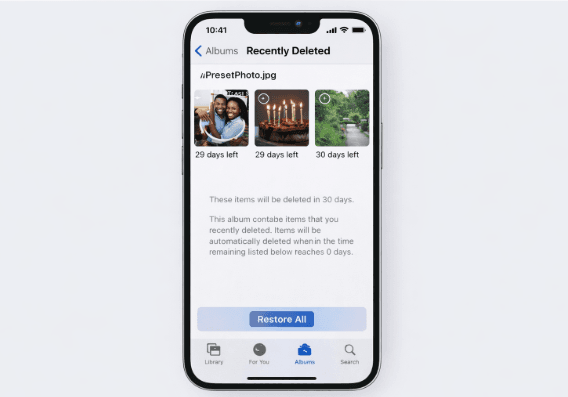
iPhone: Recently Deleted album
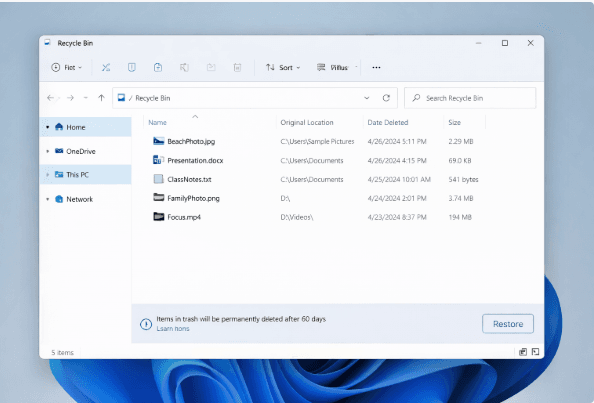
Windows: Recycle Bin
Mac: Trash folder
When you delete a photo, it usually stays in these folders for 30 to 60 days before being permanently removed. In many cases, recovery is as simple as:
Opening the trash folder
Selecting the photo
Clicking “Restore”
This method requires no software, no technical skills, and no risk.
2. Check Cloud Backups
If the photo is not in the trash folders, the next place to check is your cloud backup.
Most people don’t even realize they already have backups because:
Google Photos backs up automatically
iCloud syncs silently
OneDrive saves from laptops
Common cloud platforms:
Google Photos (Android, Gmail users)
iCloud (iPhone, Mac)
OneDrive (Windows)
Dropbox
You may find your photos still stored online even if they were deleted from your device. Cloud recovery works especially well if:
You changed phones
You reset your device
You lost your phone
3. Use Photo Recovery Software
If both trash and cloud fail, recovery software becomes the next option.
These tools scan storage devices for:
Deleted file records
Unused memory blocks
Recoverable image fragments
They work on:
Android phones
iPhones (via backups)
Windows laptops
Mac computers
SD cards
External drives
However, software recovery only works if:
The storage space was not overwritten
The device was not heavily used after deletion
This is why timing matters more than the software itself.
4. Try Professional Data Recovery Services
If the photos are extremely important and the software fails, professional recovery is the final option.
These services:
Open storage chips
Read raw memory sectors
Rebuild corrupted files
They are commonly used for:
Legal evidence
Medical records
Corporate data
Irreplaceable family memories
They are expensive but often very effective.
The Golden Rule of Photo Recovery
No matter which device you are using, always remember this rule:
The more you use a device after deleting photos, the lower your chances of recovery.
The moment you realize photos are missing:
Stop using the device
Turn off internet syncing
Do not install new apps
Do not take new photos
This single action alone can increase your recovery success rate by over 50%.
When you delete a photo, it usually does not disappear immediately.
Instead:
The system marks the space as “available.”
The data still exists in storage
It only disappears when overwritten
Think of storage like a notebook: Deleting removes the title, not the content. New data writes over old content. This is why:
You should stop using the device immediately
Installing apps can destroy recovery chances
Scanning should happen as soon as possible
How to Recover Deleted Photos on Android
Android devices offer some of the best photo recovery options because they combine local storage, cloud backups, and removable memory support. In many cases, recovering deleted photos on Android is much easier than people expect, especially if action is taken quickly.
Before trying advanced recovery tools, it is important to start with the safest and most effective methods. Each method below is arranged in the correct order of success rate.
My Personal Experience Recovering Deleted Photos on an Android Phone
My first real encounter with photo recovery happened on an Android phone, and it completely changed how I think about backups.
I had accidentally deleted a folder of photos while trying to free up space on my phone. At first, I didn’t panic because I assumed the photos were gone permanently. These were not just random pictures — they included important family moments and work-related images I had saved over several months.
Out of curiosity, I opened Google Photos, not because I expected anything, but simply to double-check. That was when I discovered the Trash folder. To my surprise, the deleted photos were still there, marked with the number of days left before permanent deletion.
I immediately selected the photos and tapped Restore. Within seconds, all the images returned to my gallery exactly as they were before. No special software. No technical process. Just a simple restore.
That experience taught me two major lessons:
First, most Android users already have a powerful recovery system without realizing it. Google Photos silently backs up images in the background, and the Trash folder acts as a safety net for mistakes.
Second, timing matters more than anything else. If I had waited beyond the 60 days or continued installing apps and taking new photos, those images could have been overwritten and lost permanently.
Later on, I tested recovery again using an SD card from another Android device. By inserting the card into a laptop and using recovery software, I was able to retrieve photos that were deleted weeks earlier. This confirmed something important: Android photo recovery works best when you act fast and avoid unnecessary device usage.
From my experience, Android offers one of the highest success rates for recovering deleted photos, especially if Google Photos or external storage is involved.
Method 1: Google Photos Trash (Most Effective)
If you use Google Photos, this is your first stop.
Steps:
Open Google Photos
Tap “Library”
Tap “Trash”
Select photos
Tap “Restore”
Photos stay here for 60 days.
Google Photos Trash screen
This method alone recovers about 70% of lost photos for most users.
Method 2: Phone Gallery Trash
Most Android phones now have their own recycle bin.
Steps:
Open Gallery app
Look for “Recently Deleted”
Restore
Samsung, Xiaomi, Infinix, Tecno, Oppo — all support this.
Method 3: SD Card Recovery
If your photos were on a memory card:
Remove the SD card
Insert into the computer
Use recovery software (Recuva, Disk Drill)
This method works extremely well because SD cards are not encrypted.
Method 4: Android Recovery Apps
Examples:
DiskDigger
Dr.Fone
EaseUS
They scan internal storage.
Limitation:
Without a root, results are limited.
With root, the success rate is high but risky.
How to Recover Deleted Photos on iPhone
Apple makes recovery harder but still possible.
Method 1: Recently Deleted
Steps:
Open Photos
Go to Albums
Scroll to Recently Deleted
Restore
Photos stay for 30 days.
iPhone Recently Deleted
Method 2: iCloud Restore
If you use iCloud:
Steps:
Go to Settings
Reset phone
Choose Restore from iCloud backup
Warning: This replaces current data.
Method 3: iTunes Backup
If you backed up on PC/Mac:
Connect iPhone
Open iTunes / Finder
Restore backup
Works well if a backup existed before deletion.
Method 4: iPhone Recovery Software
Tools:
iMyFone D-Back
Tenorshare UltData
Dr.Fone
They scan iCloud and backups without resetting the phone.
How to Recover Deleted Photos on Windows & Mac
Windows Recovery
Check the Recycle Bin
Use File History
Use Recuva or Disk Drill
Recycle Bin
Mac Recovery
Check Trash
Use Time Machine
Use Disk Drill
Mac Time Machine is one of the best backup systems ever created.
Best Free Photo Recovery Tools
These actually work:
Recuva (Windows)
Free
Very effective
Simple interface
Disk Drill (Windows/Mac)
Deep scans
Works on phones and drives
Limited free version
PhotoRec (All platforms)
Open-source
Extremely powerful
Ugly interface, but excellent results
Avoid random “miracle” apps on the Play Store.
When Photo Recovery Is Impossible
Sometimes, recovery cannot work. This happens when:
Data was overwritten
Device was factory reset + reused
Encrypted storage wiped
SSD trimmed blocks
The truth is, no software can recover overwritten data.
Can Police or Hackers Recover Deleted Photos?
This is a popular question. Technically:
Yes, with forensic tools
Only if the data was not overwritten
Only with physical device access
Modern encryption makes it extremely difficult. So no, normal people cannot secretly recover your deleted photos.
In most cases, recovering photos deleted years ago is very difficult, but not completely impossible. It depends mainly on what happened to the storage after the photos were deleted.
When a photo is deleted, the system only marks the space as available. The real data remains on the device until new data overwrites it. Over time, especially if you keep using the phone or computer, that space is usually overwritten by new files.
However, you may still recover old photos if:
The device was rarely used after deletion
The photos were backed up to the cloud
The storage was an SD card that stayed untouched
You previously synced with Google Photos or iCloud
If you deleted photos years ago but later discovered that Google Photos or iCloud was active at the time, you might still find them in your cloud account.
Without backups, recovery after several years is very unlikely, but still worth trying using deep recovery software or professional services.
Is photo recovery safe for my device?
Yes, photo recovery is generally safe if you use trusted tools and follow correct procedures.
The main risks come from:
Installing fake recovery apps
Downloading cracked software
Giving unnecessary permissions
Safe recovery practices:
Use well-known tools like Recuva, Disk Drill, EaseUS
Scan storage externally when possible
Avoid rooting or jailbreaking unless necessary
Never write recovered files back to the same device
If done properly, recovery will not damage your device or delete more data.
Can I recover deleted photos after a factory reset?
This depends on the type of device and whether backups exist.
On Android:
If Google backup was enabled before the reset, you can recover photos by:
Signing back into the Google account
Opening Google Photos
Restoring from the cloud
Without backup, recovery is very difficult because modern Android versions encrypt storage.
On iPhone:
If iCloud or iTunes backup existed, you could restore from backup.
Without backup:
Recovery is almost impossible due to encryption.
A factory reset is one of the hardest situations for recovery.
Do free photo recovery apps really work?
Some free apps work, but with limitations.
Free tools can:
Recover recently deleted files
Scan memory cards
Restore from the recycle bins
They usually cannot:
Perform deep scans
Recover encrypted data
Recover after factory reset
Paid tools are more powerful, but free tools are still worth trying first.
Can deleted photos be recovered without software?
Yes, but only in simple cases.
You can recover without software if:
Photos are in the Recently Deleted folder
Photos exist in cloud backup
Photos exist in email or WhatsApp backups
Without backups or trash folders, software is required.
Can hackers or police recover my deleted photos?
Technically, yes, but not easily.
For recovery:
Physical access is required
Specialized forensic tools needed
Encryption must be bypassed
Modern smartphones use strong encryption, making secret recovery almost impossible for ordinary people.
So realistically, your deleted photos are safe from casual snooping.
Conclusion
Losing photos can feel devastating, especially when those images carry personal memories, business value, or emotional significance. Over time, I’ve learned that photo loss is not always a disaster — it is often a reminder of how digital storage really works.
Understanding how to recover deleted photos gives you power. It turns panic into action and confusion into clarity. Whether you are using an Android phone, an iPhone, a Windows PC, or a Mac, the recovery process follows the same principle: act quickly, avoid overwriting data, and check backups before trying advanced tools.
From my own experience, the simplest solutions are often the most effective. Trash folders, cloud backups, and built-in recovery features solve the majority of cases. Recovery software and professional services should only be used when basic options fail.
If there is one takeaway from this guide, it is this:
Knowing how to recover deleted photos can save you today, but consistent backups will save you forever.
Technology will fail. Humans will make mistakes. But with the right knowledge and habits, your memories don’t have to disappear with a single tap.
I hope you found this article helpful. Share it on your social media accounts so that others can learn from it.