
In this detailed guide, you’ll learn how to hide Facebook posts from friends, explained step by step, in simple language. All you have to do is adhere to the basic instructions in this article, and you’ll be very much good to go. The steps you need are very easy.
Facebook is one of the most popular social media platforms in the world, with billions of users sharing personal updates, business content, opinions, and life moments daily. While Facebook helps us stay connected with friends, family, colleagues, and customers, there are times when you may not want everyone on your friends list to see your posts.
Maybe you want to:
- Share personal updates privately
- Promote a business without disturbing friends
- Avoid family members seeing certain opinions
- Keep your life more private
- Separate personal and professional content
Whatever your reason, Facebook provides several powerful privacy tools that allow you to hide your posts from specific friends, groups of people, or even everyone—without unfriending anyone.
READ THIS: How To Grow Facebook Page Fast – A Complete Guide
Why You May Want to Hide Facebook Posts from Friends
Before diving into the “how,” it’s important to understand why Facebook post privacy matters.
1. Personal Privacy
Not every post is meant for everyone. You may want to share personal struggles, family matters, or achievements with only a few trusted people.
2. Professional Image
If you run a business, blog, or brand (like Educatefresh.com), you may want your posts to look professional to the public while keeping casual content private.
3. Avoiding Misunderstandings
Some opinions or jokes can be misunderstood. Hiding posts helps you avoid unnecessary arguments or conflicts.
4. Content Control
Facebook friends can include colleagues, clients, relatives, and acquaintances. Privacy settings allow you to control who sees what.
Understanding Facebook Post Privacy Settings
Facebook allows you to control post visibility using audience selectors. These settings determine who can see each post.
The main audience options are:
- Public
- Friends
- Friends except…
- Specific friends
- Only me
- Custom lists
Each option serves a unique purpose, which we will explain in detail below.
How to Hide Facebook Posts from Friends (Step-by-Step Guide)
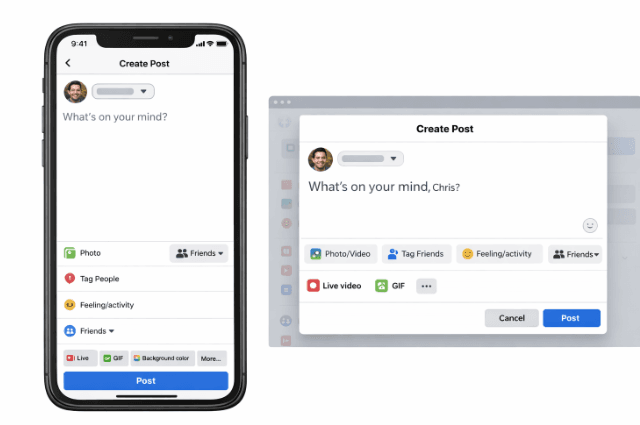
Method 1: Hide Facebook Posts from Specific Friends (Friends Except…)
This is one of the most commonly used privacy features.
What This Option Does
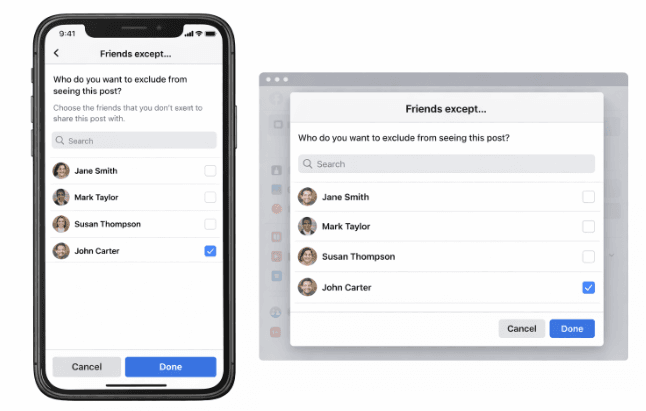
It allows you to share a post with all your friends except selected people.
When to Use It
- You want to hide posts from family members
- You want to block colleagues from seeing personal posts
- You want to hide posts from certain individuals without unfriending them
Step-by-Step Guide (Mobile & Desktop)
- Start creating a new Facebook post
- Click or tap on the audience selector (usually shows “Friends”)
- Select Friends except…
- Choose the friends you want to hide the post from
- Click Done
- Publish your post
Important Note
The selected friends will not be notified and won’t know you hid the post.
Method 2: Share Facebook Posts with Only Specific Friends
This option is the opposite of “Friends except…”
What This Option Does
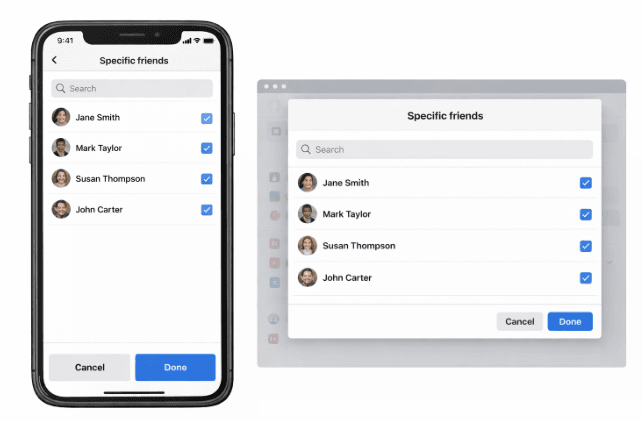
Only selected friends will see your post. Everyone else is excluded.
When to Use It
- Sharing sensitive information
- Posting family-only updates
- Sharing business ideas with partners
How to Do It
- Create a new post
- Click the audience selector
- Choose Specific friends
- Select the friends you want
- Click Done
- Post
This method ensures maximum privacy.
Method 3: Hide Facebook Posts from Everyone (Only Me)
What This Option Does
Only you can see the post.
When to Use It
- Saving drafts
- Writing reminders
- Testing posts before publishing
- Keeping private notes
Steps
- Create a post
- Click the audience selector
- Choose only me
- Publish
Your post will be completely hidden from all friends.
Method 4: Use Facebook Friend Lists to Control Visibility
Facebook allows you to create friend lists, which is one of the most powerful privacy tools.
Examples of Friend Lists
- Close Friends
- Family
- Work
- Church
- Business Contacts
How to Create a Friend List
- Go to the Facebook menu
- Click Friends
- Select Custom Lists
- Click Create List
- Name your list
- Add friends
How to Use Lists to Hide Posts
- Choose Specific friends
- Select your custom list
- Publish
This method is ideal for long-term content control.
Method 5: Change Default Post Audience
Facebook allows you to set a default audience for all future posts.
Why This Matters
If your default is “Public” or “Friends,” you may accidentally share posts with the wrong audience.
How to Change It
- Go to Settings & Privacy
- Click Settings
- Select Privacy
- Under “Your Activity,” find Who can see your future posts
- Choose your preferred audience (e.g., Friends, Specific Friends)
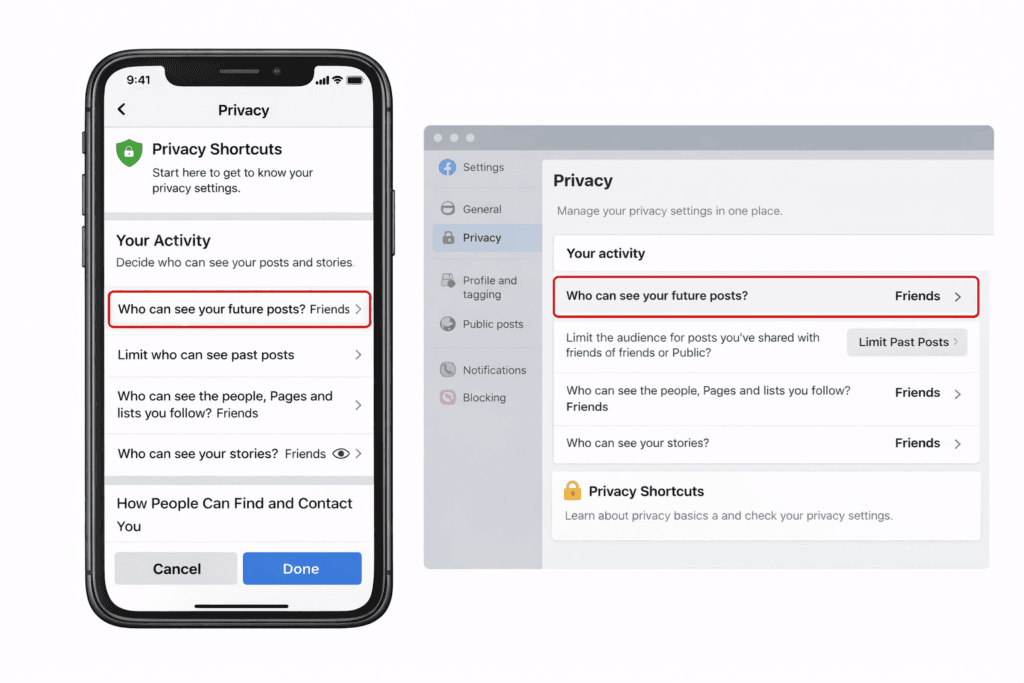
This setting helps prevent mistakes.
Method 6: Hide Past Facebook Posts from Friends
If you’ve already shared posts publicly or with friends, you can limit them.
How to Limit Past Posts
- Go to Settings & Privacy
- Click Privacy
- Select Limit Past Posts
- Confirm
What This Does
- Converts old public posts to Friends only
- Improves privacy instantly
Method 7: Hide Posts from Certain Friends Permanently (Restricted List)
Facebook has a Restricted List feature.
What It Does
Friends on this list will only see posts set to Public.
How to Add Someone to the Restricted List
- Go to the friend’s profile
- Click Friends
- Select Edit Friend List
- Choose Restricted
This is useful for coworkers, distant relatives, or acquaintances.
Method 8: Hide Posts from Friends Using Facebook Professional Mode
If you use Professional Mode, you can:
- Separate followers from friends
- Share public content for followers
- Keep personal posts for friends only
This is ideal for:
- Bloggers
- Content creators
- Publishers
- Business owners
Method 9: Hide Facebook Stories from Friends
Posts aren’t the only content you can hide—Stories, too.
How to Hide Stories
- Go to Story Settings
- Select Hide story from
- Choose friends
- Save
Stories are often more personal, so this feature is very important.
Common Mistakes to Avoid
- Forgetting to check the audience before posting
- Using “Public” accidentally
- Not reviewing default privacy settings
- Mixing business and personal content
Best Privacy Tips for Facebook Users
- Review your privacy settings monthly
- Use friend lists for organization
- Separate business and personal content
- Enable timeline review
- Avoid oversharing sensitive information
Frequently Asked Questions (FAQs)
Can someone know if I hide a post from them?
No. Facebook does not notify users when you hide a post from them. If you use options like “Friends except…” or “Specific friends,” the people you exclude will not receive any notification.
However, they may notice if they compare your profile with someone else who can see the post.
Is hiding posts better than unfriending?
In many situations, yes. Hiding posts allows you to control your privacy without damaging relationships.
Unfriending someone can sometimes create tension or misunderstandings. By hiding posts instead, you can still stay connected while controlling what they see.
This option is especially useful for:
Coworkers
Distant relatives
Business contacts
Old classmates
Can I hide posts from many friends at once?
Yes, Facebook allows you to hide posts from many friends at the same time.
You can do this by:
Using the “Friends except…” option
Creating Friend Lists
Adding people to the Restricted List
Friend lists are particularly useful if you regularly want to hide posts from the same group of people.
Can I hide a post after I have already published it?
Yes, you can change the audience of a post even after publishing it.
To do this:
Go to the post on your timeline
Click the three dots (•••) on the post
Select Edit audience
Choose your preferred audience (Friends, Only Me, Specific Friends, etc.)
The changes will apply immediately.
What happens if I add someone to the Restricted List?
When you add someone to the Restricted List, they will only see posts you set to Public.
They will not see posts shared with “Friends.”
This feature is helpful when you want to stay connected with someone but limit what they can view on your profile.
Can I hide Facebook posts from followers but not friends?
Yes. If your post is set to Friends, then followers who are not your friends will not see the post.
This means you can control whether your posts are visible to:
Friends only
The public
Specific people
This is very useful if you use Facebook Professional Mode or run a public page.
Can I hide Facebook posts from my boss or coworkers?
Yes, you can hide posts from coworkers using the “Friends except…” option.
Steps:
Create your post
Click the audience selector
Select Friends except…
Add the coworkers you want to exclude
This allows you to maintain a professional image while still posting freely.
Will hidden posts appear in Facebook search?
No. If someone cannot see your post because of privacy settings, it will not appear in their search results or news feed.
Facebook respects your audience selection, meaning only approved viewers can access the content.
Can I hide Facebook Stories from specific friends?
Yes. Facebook allows you to hide Stories from certain friends.
To do this:
Go to Story Settings
Click Hide Story From
Select the friends you want to exclude
Save your changes
Once hidden, those friends will not see your story updates.
Conclusion
Facebook gives you complete control over who sees your content—you just need to use the tools correctly. Whether you want to hide posts from specific friends, share privately, or protect your personal life, Facebook’s privacy settings make it possible.
By applying the methods explained in this How to Hide Facebook Posts from Friends guide, you can confidently post on Facebook without fear of unwanted viewers.
If you run a blog, business, or brand like Educatefresh.com, mastering Facebook privacy is a powerful step toward maintaining professionalism and peace of mind.
I believe this article was helpful. Feel free to use the comment box below for any questions, and we’ll be here to attend to you.
Does your website have a contact page? I’m having a tough time locating it but, I’d like to send you an email. I’ve got some ideas for your blog you might be interested in hearing. Either way, great blog and I look forward to seeing it grow over time.
Here is my Email = uchennamiracle1@gmail.com. I really Appreciate
Pingback: How To Sign Up Facebook Avatar From Any Country – EducateFresh