
Learning how to hide personal information online is no longer optional — it’s a basic life skill. In today’s digital world, your personal information is constantly being collected, stored, shared, and sometimes even sold without your knowledge. Every time you sign up for a website, use social media, download an app, or search for something on Google, pieces of your identity are being left behind.
Your name, phone number, email address, location, photos, interests, and even your daily habits can be accessed by companies, advertisers, data brokers, and sometimes criminals.
This guide will show you, step by step, how normal people (not hackers or tech experts) can protect their privacy using simple tools, habits, and settings.
My Personal Experience With Online Privacy
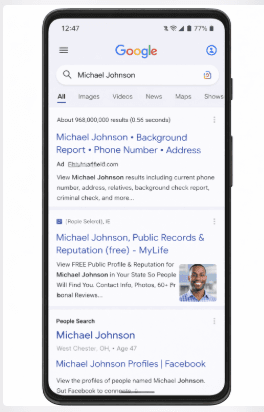
For a long time, I didn’t take online privacy seriously. Like most people, I assumed that if I wasn’t famous or doing anything illegal, nobody would care about my personal information. That mindset changed the day I searched my own name on Google and discovered how much data about me was publicly available. My old social media profiles showed my real birthday, photos from years ago, comments I had forgotten about, and even business contact details I never remembered publishing.
What shocked me the most was how easy it was to connect the dots. A stranger could find my name, then move to my Facebook profile, then my WhatsApp photo, then my business page, and within minutes, they would know where I live, what I do, who my family members are, and even my daily routine. At that moment, I realized that online privacy is not about paranoia — it’s about control.
Since then, I’ve taken deliberate steps to hide and reduce my digital footprint. I removed unnecessary public profiles, changed privacy settings, stopped using my real name on certain platforms, and separated my personal life from my business identity.
The result? Fewer spam calls, fewer scam attempts, and a much stronger sense of safety. This experience is what motivated me to write this guide, because most people only care about privacy after something bad has already happened.
RELATED ARTICLE: How to Protect Your Online Account from Hackers
How to Hide Personal Information Online
Hiding your personal information online doesn’t mean disappearing from the internet completely. It means:
Reducing how much data is publicly available
Controlling who can see your information
Preventing companies from tracking you
Making it harder for scammers to target you
Think of it like locking your doors. You’re not hiding your house — you’re just controlling access.
1. Audit What Information About You Is Already Online
Before you can protect your data, you need to know what already exists.
Search for yourself on:
Google
Bing
DuckDuckGo
Try searching:
Your full name
Your phone number
Your email address
Your username
You’ll be shocked by how much comes up.
What You’ll Often Find:
Old social media profiles
Forum posts
Public business listings
Data broker websites
Photos you forgot about
This step gives you awareness. You can’t hide what you don’t know exists.
2. Clean Up Your Social Media Accounts
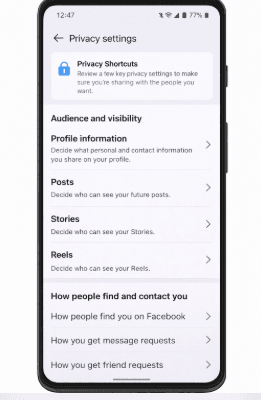
Social media is the biggest source of personal data leaks. Most people overshare without realizing it:
Birthdays
Locations
Family members
Daily routines
Workplace info
What To Do:
Facebook / Instagram / TikTok / X:
Set profile to private
Remove phone number from profile
Hide friends list
Remove workplace and school
Delete old posts
Things You Should Never Share:
Home address
Travel plans in real time
ID cards or documents
Children’s schools
Financial information
Even one post can expose patterns about your life.
3. Remove Yourself From Data Broker Websites
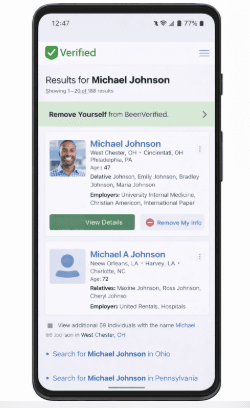
Data brokers are companies that collect and sell your personal data.
They get information from:
Public records
Online purchases
Social media
Apps
Examples:
Spokeo
Whitepages
BeenVerified
PeopleFinder
They often display:
Your phone number
Address history
Relatives
Age
How to Remove Yourself:
Visit the site
Search your name
Click “Remove” or “Opt out”
Verify by email
This process is annoying but extremely powerful.
4. Use Strong Privacy Settings on Google & Apple
Your phone knows more about you than your friends.
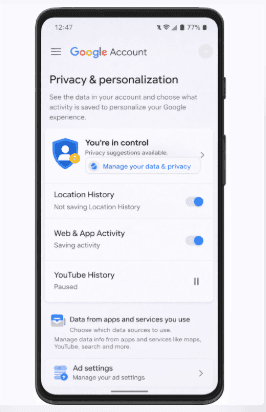
On Google:
Turn off location history
Pause web & app activity
Disable ad personalization
Delete search history
On Apple:
Disable ad tracking
Use “Limit Ad Tracking”
Review app permissions
Turn off Siri suggestions
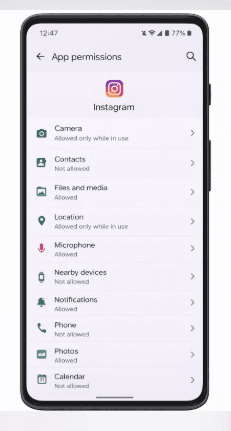
5. Control App Permissions
Many apps ask for permissions they don’t need:
Camera
Contacts
Microphone
Location
A calculator app does not need your location.
What You Should Do:
Review permissions monthly
Deny unnecessary access
Delete apps you don’t use
Your phone is a data goldmine. Every permission is a potential leak.
6. Use a VPN (Virtual Private Network)
A VPN hides your IP address and location.
It prevents:
Websites from tracking your real location
Internet providers from logging activity
Hackers from spying on public WiFi
VPN doesn’t make you invisible — but it makes you harder to track.
7. Use Privacy-Friendly Browsers & Search Engines
Avoid browsers that track you heavily.
Better Options:
Brave
Firefox
DuckDuckGo browser
Better Search Engines:
DuckDuckGo
Startpage
They don’t store your search history or profile you.
8. Create Separate Emails for Different Uses
Never use one email for everything.
Use:
One for social media
One for banking
One for shopping
One for subscriptions
This prevents:
Spam
Account linking
Identity profiling
9. Use Strong Passwords & a Password Manager
If one account is hacked, others follow.
Good Password Rules:
Minimum 12 characters
No names or birthdays
Unique for every site
Use tools like:
Bitwarden
1Password
LastPass
10. Avoid Oversharing in Real Life Too
Privacy isn’t only digital.
Avoid sharing:
Your number on public forms
Your birthday on every site
Your real name in forums
Once information is out, you can’t take it back.
11. Hide Your Domain & Website Information
If you own a website, your details may be public via WHOIS.
Use:
Domain privacy protection
Otherwise your:
Name
Email
Phone
Address
becomes visible globally.
12. Use Two-Factor Authentication (2FA)
Even if someone knows your password, they still can’t log in.
Always enable 2FA for:
Email
Banking
Cloud storage
13. Regularly Delete Old Accounts
Every unused account is a future risk.
Search your inbox for:
“Welcome to”
“Thanks for signing up.”
Delete accounts you no longer use.
Psychological Side of Online Privacy (Most People Ignore This)
The biggest threat to online privacy is not hackers — it’s human behavior. Most people overshare because of emotional reasons:
The need for validation
The desire to be seen
Fear of missing out
Wanting attention
Wanting to belong
Social media platforms are designed to reward exposure. Likes, views, comments, and followers create dopamine loops that make people share more than they should. Over time, users stop asking, “Should I post this?” and start asking, “Will this get engagement?”
This mindset leads to dangerous habits:
Posting live locations
Showing home interiors
Sharing family members
Revealing schedules
Announcing travel plans
Psychologically, people underestimate risk because harm feels distant. You don’t see the person watching your data. You don’t feel the consequences immediately. But data accumulates quietly, and once information is online, it is almost impossible to fully erase.
Another problem is false security. People think:
“My account is private.”
“Only my friends see it.”
“Nobody cares about me.”
But screenshots exist. Data brokers exist. Algorithm indexing exists. What feels private today can become public tomorrow.
True online privacy requires a mindset shift:
Post as if everything you share will be public forever.
That one rule alone will save most people from future regret.
Frequently Asked Questions (FAQs)
Can I completely erase myself from the internet?
No, and anyone promising that is lying. You can reduce your digital footprint significantly, but total disappearance is unrealistic. The goal is control, not invisibility.
Is using a VPN enough to protect my privacy?
A VPN helps hide your location and IP address, but it does not stop you from oversharing on social media or leaking data through forms and profiles. VPN is a tool, not a solution.
Are people search websites dangerous?
Yes. These sites aggregate public records and make stalking easier. They often show addresses, relatives, and phone numbers. You should remove your data from them whenever possible.
Should I use my real name online?
Not always. For personal accounts, using your real name is fine. For forums, business experiments, or public comments, using a pseudonym adds an extra layer of protection.
Does deleting social media improve privacy?
It can, but only if you also remove old data. Many deleted accounts still leave traces through tags, mentions, and cached pages.
Is it safe to share personal photos online?
Only if you control who sees them. Family photos, home photos, and travel photos should never be public. They reveal more than people realize.
What is the biggest privacy mistake people make?
Trusting platforms instead of controlling themselves. Platforms are built for exposure, not protection.
Conclusion
In a world where data is more valuable than money, learning how to hide personal information online is no longer optional — it is essential. You don’t need to live in fear or stop using the internet, but you must become intentional about what you share, where you share it, and who can see it. Online privacy is not about hiding from life; it’s about owning your digital identity before someone else does.
The people who stay safest online are not the most technical — they are the most aware.
I believe this how to Hide Personal Information Online guide was helpful. Feel free to share on your social media accounts so that others can learn from it.