
In this guide, you’ll learn how to free up storage on your phone properly, not just temporarily. These are real, practical steps that actually work, and you can follow the steps given to set your phone storage free. If you’ve ever seen the message “Storage Almost Full”, you’re not alone. It’s one of the most common problems smartphone users face worldwide.
Whether you’re using an Android or iPhone, your phone slowly fills up with:
Photos and videos
Apps you forgot about
Cached files
WhatsApp media
System junk
The worst part? Most people delete one or two photos and think they’ve solved it, but the problem keeps coming back. This article will guide you through the steps you need to take.
Most people don’t realize how fast phone storage fills up until they see the warning message: “Storage almost full.” It usually happens gradually — a few photos today, some videos tomorrow, app updates in the background, WhatsApp media, TikTok downloads, cached files, and before you know it, your phone starts slowing down. I’ve personally experienced this on both Android and iPhone.
At one point, my phone couldn’t even install basic app updates because there was less than 200MB left. That was when I understood that freeing up storage is not just about deleting files, but about learning how your phone actually uses space and managing it intentionally.
How to Free Up Storage on Your Phone (Step-by-Step)
Without much ado, simply follow the steps below to free up your phone storage.
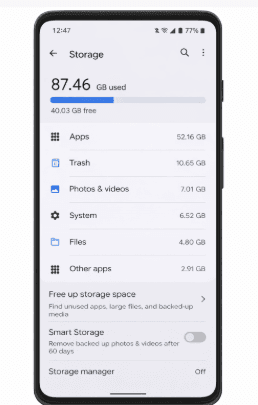
1. Check What Is Using Your Storage First
Before deleting anything, you need to know what is eating your space.
On Android:
Go to Settings → Storage
On iPhone:
Settings → General → iPhone Storage
You’ll see categories like:
Apps
Photos
Videos
System
Documents
This step alone changes everything. Many people think photos are the problem, but in reality, apps and cached files are the real storage killers.
2. Delete Unused Apps (The Biggest Hidden Space Waster)
Most people install apps and never delete them. Think about:
Games you stopped playing
Shopping apps you used once
Banking apps from old accounts
Some apps take 500MB – 3GB each.
Pro tip:
If you haven’t used an app in 30 days, delete it. You can always reinstall later.
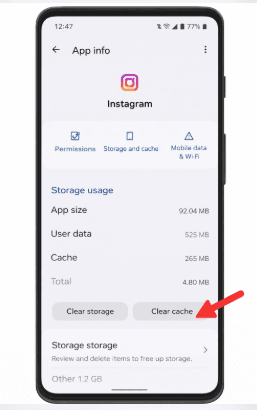
3. Clear App Cache (Especially on Android)
Cache is temporary data stored by apps.
Examples:
Over time, cache can grow to several gigabytes.
On Android:
Settings → Apps → Select App → Storage → Clear Cache
On iPhone:
You usually need to:
Delete app
Reinstall app
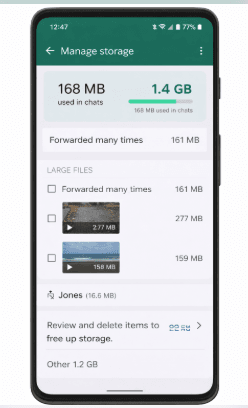
4. WhatsApp Is Probably Eating Your Storage
Globally, WhatsApp is one of the biggest storage criminals.
It stores:
Every photo
Every video
Every voice note
Even from groups you muted.
How to fix:
WhatsApp → Settings → Storage and Data → Manage Storage
Delete:
Large videos
Old forwarded files
Group media
Many people recover 5GB–20GB instantly here.
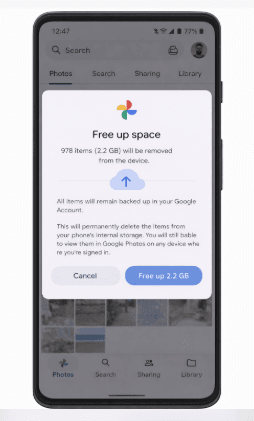
5. Google Photos / iCloud Is Not Magic
Cloud storage doesn’t automatically free space unless you tell it to.
Google Photos:
Tap profile → Free up space
iCloud:
Settings → Photos → Optimize Storage
This keeps full files in cloud, small versions on phone.
6. Delete Duplicate Photos and Videos
People take:
10 photos of the same thing
5 screenshots of one page
Screen recordings they forgot
Use:
Google Files
iOS duplicate finder
Delete ruthlessly. Emotion is expensive in storage.
READ THIS: Best Security Apps to Protect Your Phone
7. Downloaded Files Folder Is a Graveyard
Go to:
File Manager
Downloads
You’ll find:
PDFs
Old images
APKs
Installers
Most are useless. Simply delete them.
8. Clear Browser Data
Chrome, Safari, Opera store:
Cookies
Images
Pages
Clear:
Browsing history
Cached images
This improves speed too.
9. Move Media to External Storage
If your phone supports:
SD card
USB drive
Move:
Videos
Movies
Large files
Keep only what you need on internal storage.
10. Use Storage Cleaner Apps (Carefully)
Good options:
Google Files
CCleaner
Smart Cleaner
Avoid apps that:
Show too many ads
Ask for full control
Promise miracles
No app can replace common sense.
11. Delete Offline Content
Apps store offline data:
Spotify downloads
Netflix movies
YouTube videos
These are often forgotten.
Delete old ones.
12. Reset Your Phone (Last Option)
If nothing works:
Backup important files
Factory reset
This gives you:
Fresh system
Maximum speed
Clean storage
But only do this once a year at most.
From personal experience, most people don’t actually need more storage. They just need better storage habits. I’ve seen phones with:
128GB storage
Still completely full
Why? Because no one ever:
Reviews files
Deletes media
Cleans apps
Once you build a habit of cleaning monthly, your phone will never run out of space again.
Common Mistakes People Make
Deleting random photos only
Ignoring WhatsApp
Keeping unused apps
Trusting fake cleaner apps
Never checking storage breakdown
Storage Habits That Save You Long-Term
Clean once per month
Avoid auto-download media
Use cloud properly
Delete duplicates weekly
Install fewer apps
Frequently Asked Questions (FAQs)
- Is it safe to delete cache files?
Yes. Cache files are temporary and automatically regenerated. Deleting them does not harm your phone or apps.
- Why is my phone still full after deleting photos?
Because:
Apps store hidden data
WhatsApp keeps copies
System files grow
Downloads folder is full
Photos are only part of the problem.
- Do storage cleaner apps really work?
Some help identify junk, but none can replace manual cleaning. Many show fake results or push ads.
- How often should I clean my phone storage?
Once a month is ideal for most users. Heavy users may need weekly cleaning.
- Will upgrading my phone solve this forever?
No. Bigger storage only delays the problem. Without habits, even 256GB will fill up.
- Is it better to use cloud or physical storage?
Cloud is safer. External storage is faster. Best option is using both.
- Can deleting apps damage my phone?
No. You can always reinstall apps. The only risk is losing unsaved data.
Conclusion
Learning how to free up storage on your phone is not about buying a bigger phone or paying for more cloud space. It’s about understanding how your device actually stores data and building simple habits that keep it clean.
Once you start managing your apps, media, and cached files properly, your phone will stay fast, responsive, and stress-free for years — no matter where you live or what device you use.
Most people struggle with storage because they never learned the basics. Now you have.
I believe this article was helpful. Feel free to share on your social media accounts so that others can learn from it. Also, use the comment box below for any questions and Educatefresh.com will be here to attend to you.