
How to Create Yahoo Mail Account – As a student, job seeker, or regular internet user, having a reliable email account is very important for communication, registrations, and accessing online services. One of the most widely used email platforms available today is Yahoo Mail.
A Yahoo Mail account allows users to send and receive emails, register on websites, apply for jobs, and manage different online accounts. Because of its large storage capacity, strong security system, and easy-to-use interface, Yahoo Mail remains a popular choice for millions of people around the world.
In this guide, you will learn:
What Yahoo Mail is
Who should use Yahoo Mail
Key features of Yahoo Mail
How to create a Yahoo Mail account step-by-step
Yahoo Mail security features
Frequently asked questions
SEE THIS: Tips On How To Get Listed On Yahoo News (Complete Guide)
What Is a Yahoo Mail Account?
A Yahoo Mail account is a free email service provided by Yahoo that allows users to send, receive, and store emails online.
When you create a Yahoo Mail account, you receive a personal email address that usually looks like this:
example@yahoo.com. This email address can be used for many purposes, such as:
Sending and receiving messages
Registering on websites
Applying for jobs
Receiving newsletters
Managing online accounts
Another advantage of Yahoo Mail is that your account also acts as a Yahoo ID, which allows you to access several other Yahoo services with one login.
These services include:
Yahoo News
Yahoo Finance
Yahoo Sports
Yahoo Search
Flickr
Who Should Use a Yahoo Mail Account?
Yahoo Mail is suitable for many types of users who need a reliable and free email service.
Students
Students often need an email account for:
Educational registrations
Communication with teachers
Submitting assignments
Online learning platforms
Job Seekers
Many companies request job applications through email. A Yahoo Mail account helps job seekers:
Send CVs and cover letters
Receive interview invitations
Communicate with employers
Small Business Owners
Small business owners use email to communicate with customers and partners.
Yahoo Mail can help with:
Sending invoices
Responding to customer inquiries
Managing online business registrations
Bloggers and Content Creators
Bloggers and online creators use email to manage their online activities, communicate with readers, and receive partnership offers.
Key Features of Yahoo Mail
Yahoo Mail provides several features that make it a powerful and reliable email platform.
1. Large Free Storage
One of the biggest advantages of Yahoo Mail is its 1TB free storage space.
This means users can:
Store thousands of emails
Keep attachments and documents
Avoid deleting emails frequently
Compared to many email providers, Yahoo Mail offers significantly more free storage.
2. Simple and User-Friendly Interface
Yahoo Mail has a clean and easy-to-use interface that allows users to navigate their inbox without difficulty.
Users can easily access:
Inbox
Sent messages
Draft emails
Spam folder
Trash folder
The interface is designed to work smoothly on both computers and mobile devices.
3. Powerful Spam Protection
Yahoo Mail includes advanced spam filters that automatically detect and block suspicious emails.
This helps users:
Avoid phishing attacks
Protect personal information
Maintain a clean inbox
4. Email Organization Tools
Yahoo Mail allows users to organize emails efficiently.
Users can:
Create folders
Use filters to sort emails
Search messages quickly
This makes it easier to find important emails whenever needed.
5. Attachment Support
Yahoo Mail allows users to send attachments such as:
Documents
Photos
PDF files
Presentations
Each email can contain attachments up to 25MB. Users can also preview attachments without downloading them.
6. Mobile App Support
Yahoo Mail is available as a mobile application for Android and iOS devices. With the mobile app, users can:
Check emails anywhere
Receive instant notifications
Reply to messages quickly
Manage multiple email accounts
How to Create Yahoo Mail Account
Creating a Yahoo Mail account takes only a few minutes and can be done using a smartphone or computer.
Step 1: Visit the Yahoo Sign-Up Page
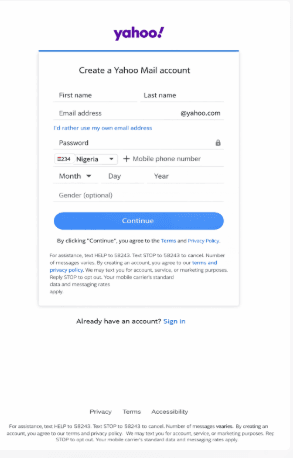
Open your browser and go to the Yahoo sign-up page. You will see a registration form requesting your personal information.
Step 2: Enter Your Personal Information
Fill in the following details:
First name
Last name
Email address you want
Password
Choose a strong password that includes letters and numbers.
Step 3: Enter Your Phone Number
Next, select your country code and enter your mobile phone number. Yahoo uses this number to verify your identity and secure your account.
Step 4: Enter Your Date of Birth
Provide your birth date to complete your profile information. You may also select your gender, but this is optional.
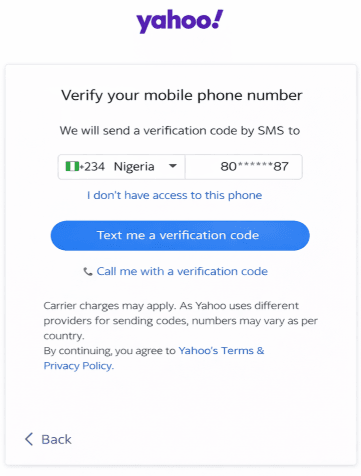
Step 5: Verify Your Phone Number
- Click Text me an Account Key.
- Yahoo will send a verification code to your phone.
- Enter the code in the box provided and click Verify.
Step 6: Complete Account Creation
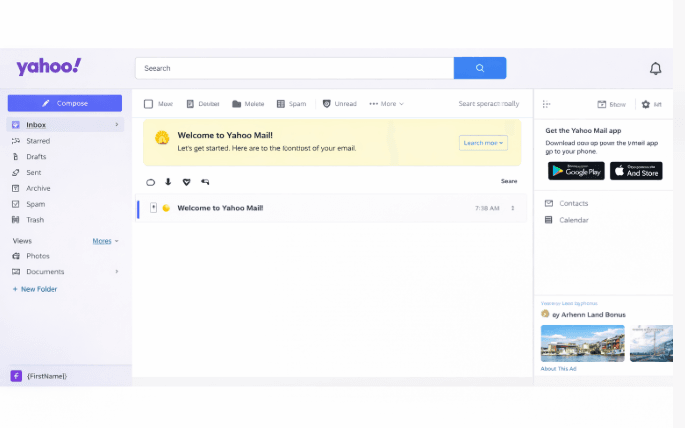
- Click Let’s Get Started.
- Your Yahoo Mail account will be created successfully, and you will be taken to your inbox.
Yahoo Mail Account Login Steps
To log in to your Yahoo Account, follow the Steps Below.
- Go to www.yahoo.com
- Click on Sign in at the top right Corner of the Page
- Then Enter your Email Address and Click on Next
- On the Next page, enter your Password and click on Sign in
Congratulations, you now have a Yahoo Mail Account.
Yahoo Mail Account Security Features
Yahoo Mail provides several security features designed to protect user accounts.
1. Two-Step Verification
Yahoo Mail supports two-factor authentication (2FA), adding an extra layer of security by requiring a code sent to your phone.
2. Account Key
Instead of passwords, Yahoo offers Account Key, which allows you to approve sign-ins directly from your phone.
3. Suspicious Activity Alerts
Yahoo notifies users if:
- Someone tries to log in from a new device
- There is unusual account activity
4. Recovery Options
You can recover your account using:
- Phone number
- Backup email address
This helps prevent permanent account loss.
Yahoo Mail vs Other Email Services
Yahoo Mail stands out mainly because of its large free storage capacity.
Is Yahoo Mail Safe?
Yes, Yahoo Mail is generally safe when:
- Security features are enabled
- Strong passwords are used
- Phishing emails are avoided
Yahoo continuously updates its security systems to protect users.
Frequently Asked Questions (FAQ)
Is Yahoo Mail free?
Yes, Yahoo Mail is completely free to use. Anyone can create a Yahoo Mail account without paying any registration fee. The free version includes access to the email service, large storage capacity, spam protection, and access to other Yahoo services.
However, Yahoo also offers a premium version called Yahoo Mail Plus, which removes advertisements and provides additional features.
Can I create more than one Yahoo Mail account?
Yes, it is possible to create multiple Yahoo Mail accounts. Many people create separate accounts for different purposes, such as personal communication, business use, or online registrations. However, each account usually requires a unique phone number for verification during the registration process.
Does Yahoo Mail expire?
Yahoo Mail accounts generally remain active as long as they are used regularly. If an account stays inactive for a long period of time, Yahoo may deactivate it. To avoid this, it is recommended to log in to your Yahoo Mail account occasionally and keep it active.
Can Yahoo Mail be used for business communication?
Yes, Yahoo Mail can be used for business communication, especially for freelancers, small business owners, and entrepreneurs. It allows users to send professional emails, share documents, and communicate with clients or customers. However, larger companies may prefer business email services that use custom domains.
Can I access Yahoo Mail on my mobile phone?
Yes, Yahoo Mail can be accessed on smartphones and tablets through the Yahoo Mail mobile application. The app is available for both Android and iOS devices. Users can also access their Yahoo Mail accounts through mobile web browsers if they prefer not to install the app.
What should I do if I forget my Yahoo Mail password?
If you forget your Yahoo Mail password, you can easily recover your account using the password recovery option. Yahoo will ask you to verify your identity using your registered phone number or backup email address. Once your identity is confirmed, you will be able to create a new password and regain access to your account.
How secure is Yahoo Mail?
Yahoo Mail includes several security features designed to protect users from unauthorized access. These features include spam filtering, suspicious activity alerts, two-step verification, and account recovery options. Users can further improve their security by using strong passwords and enabling additional security settings.
Conclusion
A Yahoo Mail account remains one of the most reliable email services available today. With its massive free storage, strong security features, and easy accessibility, Yahoo Mail continues to serve millions of users around the world.
Whether you need an email account for school, job applications, or personal communication, Yahoo Mail provides a dependable and user-friendly solution.
By understanding its features and following the steps explained in this guide, you can easily create and manage your Yahoo Mail account.
If you have any questions about how to create a Yahoo Mail account, feel free to use the comment section below. Also, share this article on your social media platforms so others can benefit from this guide.
Thanks Admin, creating yahoo mail account is quite easy, I was really finding it difficult until this site helped me through with it.
https://www.techsmoothy.com/
Click on the site link to learn how to create yahoo mail account and How to log in to your Yahoo mail Personal Account.
Pingback: Fully Funded Scholarships 2026: How To Apply – EducateFresh