
If you’re using a smartphone and wondering how to create a Facebook account using your mobile device, this guide will walk you through the entire process step by step. The instructions are simple and suitable for beginners using Android phones or iPhones.
Facebook remains one of the most popular social media platforms in the world, with billions of users connecting daily for communication, business, entertainment, and networking. Whether you want to stay in touch with friends and family, promote a business, join online communities, or consume news and entertainment, having a Facebook account is essential.
By the end of this article, you’ll know:
- How to create a Facebook account on mobile
- Requirements for Facebook registration
- How to verify your Facebook account
- Common Facebook sign-up problems and solutions
- Tips to secure your new Facebook account
READ THIS: Gmail Registration – Create Gmail Account (Step-by-Step Guide)
What You Need Before Creating a Facebook Account
Before you start, make sure you have the following:
- A mobile device (Android phone or iPhone)
- Internet connection (Wi-Fi or mobile data)
- A valid phone number or email address
- Your real name and date of birth
Facebook requires accurate information to maintain authenticity and security on the platform.
Why Create a Facebook Account?
Creating a Facebook account allows you to:
- Connect with friends and family worldwide
- Join groups and communities
- Promote businesses and personal brands
- Buy and sell items on Facebook Marketplace
- Watch videos and live streams
- Run ads and manage business pages
- Stay updated with news and trends
How To Create a Facebook Account Using Your Mobile Device
Method 1: Using the Facebook App
This is the recommended method because it’s faster and more stable.
Step 1: Download the Facebook App
For Android:
- Open Google Play Store
- Search for Facebook
- Tap Install
- Wait for the app to download
For iPhone:
- Open Apple App Store
- Search for Facebook
- Tap Get
- Authenticate and install
Step 2: Open the Facebook App
Once installed:
- Tap the Facebook app icon
- On the welcome screen, tap Create New Facebook Account
Step 3: Enter Your Name
- Enter your first name and surname
- Use your real name to avoid account restrictions
- Tap Next
Step 4: Enter Your Date of Birth
- Select your correct date of birth
- Facebook uses this to verify age eligibility
- You must be at least 13 years old
- Tap Next
Step 5: Select Your Gender
Choose one of the options provided:
- Male
- Female
- Custom (optional)
Tap Next to continue.
Step 6: Enter Your Mobile Number or Email Address
You can register using either:
- Phone number (recommended for easy recovery), or
- Email address
Enter the details correctly, then tap Next.
Step 7: Create a Password
- Choose a strong password
- Use a mix of letters, numbers, and symbols
- Do not share your password with anyone
Tap Next.
Step 8: Agree to Facebook Terms & Policies
Facebook will display its:
- Terms of Service
- Privacy Policy
Tap Sign Up to continue.
Step 9: Verify Your Facebook Account
Facebook will send a:
- SMS code (if you used a phone number), or
- Email verification code
Enter the code to verify your account, and your Facebook account is now active.
Method 2: Using a Mobile Browser
If you don’t want to install the app, you can use your phone’s browser.
Step 1: Open Your Mobile Browser
- Use Chrome, Safari, or any browser
- Visit Facebook’s official website at www.facebook.com
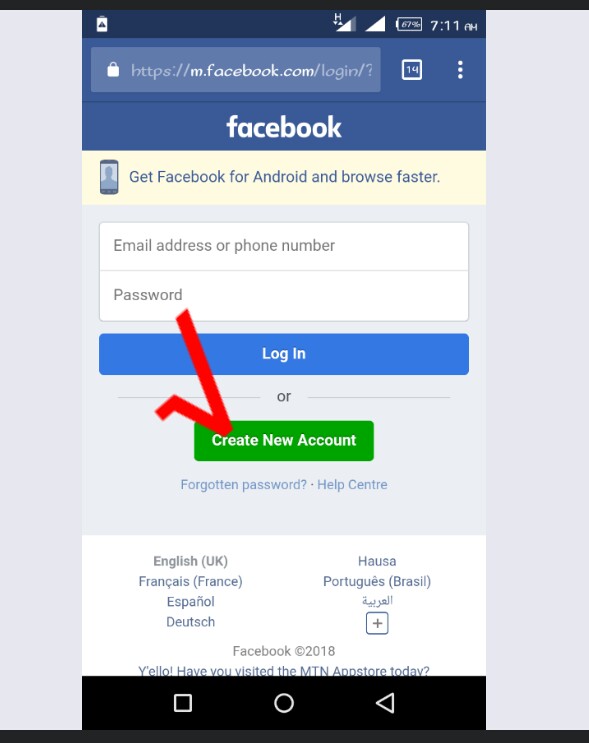
Step 2: Tap “Create New Account”
On the homepage:
- Tap Create New Account
- Click on Create New Account

- Next, enter your first name and surname (enter the name you use in real life)
- Click Next
- Confirm your date of birth and click Next
- Then follow the onscreen instructions to complete your registration
How To Set Up Your Facebook Profile After Sign-Up
Once your account is created, set up your profile properly.
Add a Profile Picture
- Use a clear photo of yourself
- Avoid fake or random images
Add a Cover Photo
Choose a simple, attractive image
Update Bio Information
Add your location, education, or workplace (optional)
Find Friends
Sync contacts or search manually
Facebook Account Security Tips
I have heard several cases where people’s Facebook accounts were compromised. To keep your account safe, do the following;
- Enable Two-Factor Authentication
- Use a strong, unique password
- Avoid clicking suspicious links
- Log out of public devices
- Review privacy settings regularly
Common Problems When Creating a Facebook Account & Solutions
Verification Code Not Received
Solution:
- Check the network signal
- Request a resend
- Try email instead
Facebook Says “Account Disabled”
Solution:
- Use real information
- Avoid creating multiple accounts at once
- Follow Facebook community standards
Phone Number Already in Use
Solution:
- Use a different number
- Recover the old account if it’s yours
Facebook App Not Installing
Solution:
- Free up storage space
- Update your phone OS
- Restart your device
Can You Have More Than One Facebook Account?
Facebook allows one personal account per person. Creating fake or duplicate personal accounts can lead to suspension.
However, you can create:
- Multiple Facebook Pages
- Multiple Facebook Groups
- Use Professional Mode on your profile
Facebook Account Age Requirement
- Minimum age: 13 years
- Some features may require age verification
- Parents should guide younger users
Benefits of Creating a Facebook Account on Mobile
- Easy access anytime, anywhere
- Instant notifications
- Camera integration for posts and stories
- Faster messaging via Messenger
Facebook App vs Facebook Lite (Which Should You Use?)
| Feature | Facebook App | Facebook Lite |
|---|---|---|
| Size | Large | Small |
| Data Usage | High | Low |
| Performance | Better | Optimized for slow networks |
| Best For | Modern smartphones | Low-end phones |
If you have limited storage or data, Facebook Lite is a great option.
Frequently Asked Questions (FAQs)
Is Facebook free to use?
Yes, creating and using a Facebook account is completely free.
Can I change my name later?
Yes, but Facebook limits how often you can change it.
Can I use Facebook without a phone number?
Yes, you can sign up using an email address.
Conclusion
Learning how to create a Facebook account using your mobile device is simple and takes only a few minutes. With just a smartphone and internet connection, you can join one of the world’s largest social networks and start connecting, learning, and growing immediately.
Whether you’re creating an account for personal use, business, or networking, following the steps in this guide ensures a smooth and secure registration process.
Meanwhile, feel free to use the comment box below for any questions on this article. Also, share this article on your social media accounts so that others can know about it.
Pingback: Facebook Lite Download | Faster Facebook Experience for Android. – EducateFresh
Pingback: How to Find My Forgotten Password: A Complete Step-by-Step Guide for 2026 – EducateFresh
Pingback: How to Start Affiliate Marketing in Nigeria (From My Experience)