
For many bloggers and website owners, getting approved for Google AdSense is an exciting milestone. It means your website can finally start generating revenue through advertisements. However, many people experience Google AdSense rejection when they first apply. After submitting their website for review, they receive an email from Google saying that their site does not meet the program requirements.
This situation can be frustrating, especially for beginners who have spent time building their websites. The truth is that Google AdSense rejections are very common, and they happen for specific reasons. Most of these issues are related to content quality, website structure, or policy compliance.
The good news is that once you understand these issues, you can fix them and successfully get approved.
This Google AdSense rejection guide explains:
Why websites get rejected by AdSense
The most common AdSense rejection reasons
How to fix those issues step by step
Tips to increase your chances of approval
If you plan to monetize your blog or website with AdSense, this guide will help you prepare your site properly.
Understanding Google AdSense Approval
Before approving a website, Google carefully reviews several aspects of your site.
These include:
Content originality
Website structure
User experience
Compliance with Google policies
Overall website quality
Google wants to ensure that websites displaying ads provide visitors with valuable and trustworthy information. Websites that provide helpful content and a good user experience are more likely to get approved.
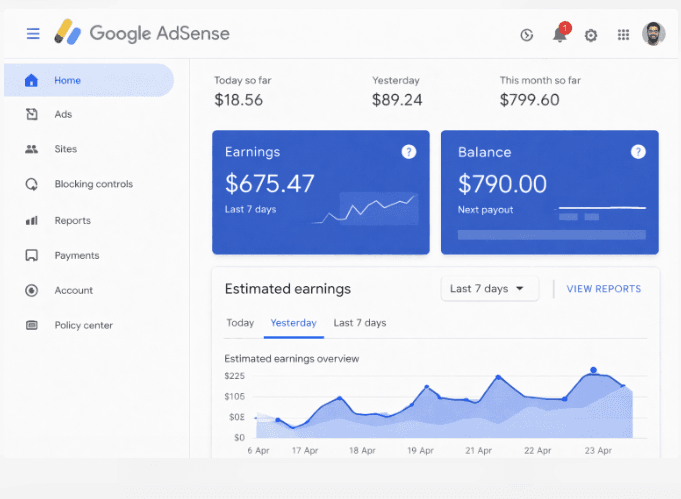
My Personal Experience With Google AdSense Rejection
When I first started learning about making money online through blogging, one of the first monetization platforms I discovered was Google AdSense. Like many beginners, I was excited about the idea of earning money from my website by simply displaying ads.
After building my website and publishing a few articles, I decided to apply for AdSense. I believed my website was ready. However, after a few days, I received an email from Google saying that my site was not approved.
At that moment, I realized that getting approved for AdSense requires more than just having a website. I started researching the common reasons Google AdSense rejects websites, and I discovered several important factors that many beginners overlook.
For example, I noticed that many websites apply for AdSense with very few articles, missing important pages like Privacy Policy, or publishing content that does not provide enough value to readers. This experience helped me understand that AdSense approval is not about applying quickly, but about building a quality website that provides useful information for visitors.
After improving content quality, organizing website pages, and learning more about Google’s requirements, it became much clearer what websites need to qualify for AdSense.
This is why I created this Google AdSense rejection guide—to help beginners understand the most common mistakes and how to fix them before applying again.
READ THIS: How to Set Up Google Adsense in Nigeria
Common Google AdSense Rejection Reasons
Understanding Google AdSense rejection reasons is the first step toward fixing them.
Some of the most common issues include:
Low-quality content
Insufficient content
Missing important pages
Copyright violations
Poor website navigation
Policy violations
Let’s look at each of these in detail.
1. Low Quality Content
Low-quality content is one of the biggest reasons websites face Google AdSense rejection.
Google values content that is:
Informative
Original
Useful to readers
If your articles are poorly written or copied from other websites, your application may be rejected.
How to Fix It
To improve content quality:
Write detailed articles
Solve problems for readers
Use clear headings and structure
Avoid duplicate content
Publishing helpful tutorials and guides greatly improves your chances of approval.
2. Insufficient Content
Another common reason for Google AdSense rejection is having too little content.
If your website only has a few posts, Google may consider it incomplete.
Recommended Content Amount
Many successful websites apply for AdSense after publishing:
20 to 30 quality articles
Each article is at least 800–1200 words
Having more helpful content shows Google that your website is active and valuable.
3. Copyrighted Content Issues
Using copyrighted images, videos, or articles without permission can result in an AdSense rejection.
Google wants websites to respect intellectual property rights.
How to Fix It
Use:
Original images
Royalty-free images
Screenshots
Avoid copying images from other websites without permission.
4. Missing Important Website Pages
Websites applying for AdSense should have several important pages that provide transparency and credibility.
These include:
About Us
Contact Us
Privacy Policy
Disclaimer
These pages help users understand who runs the website and how their data is handled.
5. Poor Website Navigation and User Experience
A website should be easy for visitors to navigate.
Google reviewers check whether users can easily find content on your site.
Improve Navigation by Adding
Clear menu
Categories
Internal links
Search function
A well-organized website improves both user experience and SEO.
6. Website Not Indexed on Google
If your website is not indexed on Google, AdSense may reject it because Google cannot verify your content.
How to Fix It
Submit your website to Google Search Console.
7. Thin or AI-Generated Content
Content that lacks depth or usefulness may also lead to rejection.
Google prefers content that demonstrates expertise and provides helpful information.
Improve Content by Writing
Detailed guides
Tutorials
Case studies
Quality matters more than quantity.
8. Policy Violations
Google AdSense has strict policies regarding website content.
Websites containing prohibited content will not be approved.
Examples include:
Adult content
Illegal activities
Harmful or violent content
Always review the official AdSense policy guidelines before applying.
Step-by-Step Guide to Fix Google AdSense Rejection
If your website receives a Google AdSense rejection, follow these steps.
Step 1: Improve Your Content
Add more helpful and original articles.
Step 2: Add Essential Pages
Create pages such as Privacy Policy and Contact.
Step 3: Fix Navigation Issues
Organize your website categories and menus.
Step 4: Check Google Policies
Ensure your content follows AdSense rules.
Step 5: Reapply for AdSense
After fixing the issues, submit your website again.
Many bloggers get approved after the second or third attempt.
Essential Pages Required for AdSense Approval
Every website applying for AdSense should have these pages.
About Us
Explain what your website is about and who runs it.
Contact Us
Provide a way for visitors to reach you.
Privacy Policy
Explain how user data is collected and used.
Disclaimer
Clarify that your content is for informational purposes.
Tools That Improve Your Website Quality
Improving your website’s quality is one of the most effective ways to reduce the chances of Google AdSense rejection. Google wants to approve websites that provide a good user experience, useful content, and proper technical structure.
Fortunately, several tools can help you analyze, improve, and optimize your website before applying for AdSense.
Below are some of the most important tools every blogger or website owner should use.
1. Google Search Console
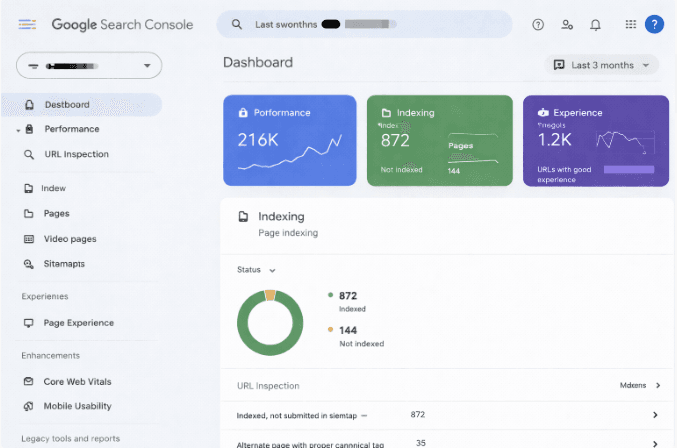
Google Search Console is one of the most essential tools for website owners. It helps you monitor how your website appears in Google search results and identifies issues that may affect your site’s performance.
With Google Search Console, you can:
Check whether Google indexes your website pages
Monitor search traffic and keyword performance
Identify technical issues affecting your website
Submit your sitemap to Google
Fix indexing errors
If your website is not properly indexed on Google, it can increase the chances of Google AdSense rejection because Google may not be able to verify your content.
Using Search Console regularly helps ensure that your website is visible to search engines.
2. Google Analytics
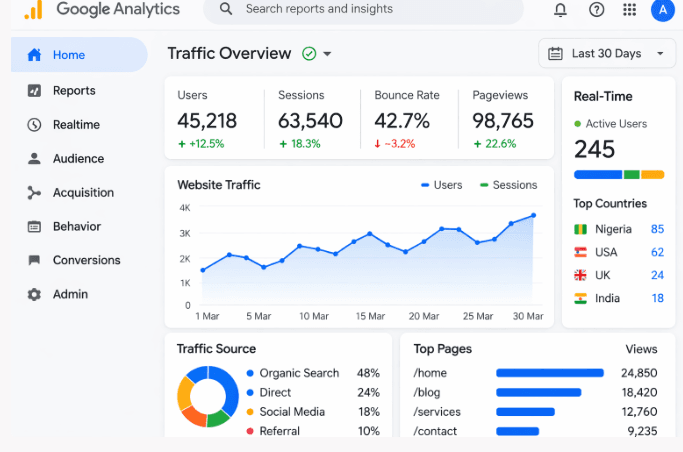
Google Analytics helps you understand how visitors interact with your website. It provides valuable data about your audience, traffic sources, and user behavior.
Some of the insights you can gain from Google Analytics include:
Number of visitors to your website
Pages that receive the most traffic
User engagement and session duration
Traffic sources such as Google search, social media, or direct visits
Understanding these metrics helps you improve your content and user experience, which can strengthen your website before applying for AdSense.
3. Grammarly
High-quality writing is essential for blogging success and AdSense approval. Grammarly is a popular tool that helps writers improve their grammar, spelling, and clarity.
Using Grammarly can help you:
Fix grammar mistakes
Improve sentence clarity
Avoid spelling errors
Maintain a professional writing style
Articles with clear and well-structured writing provide a better reading experience and increase your chances of passing Google’s content review.
4. Website Speed Testing Tools
Website speed is another important factor for both SEO and user experience. Slow websites frustrate visitors and may reduce your chances of AdSense approval.
Tools like Google PageSpeed Insights can analyze your website speed and suggest improvements.
These tools can help you:
Identify slow-loading pages
Optimize images
Improve website performance
Reduce loading time
A faster website provides a better experience for visitors and makes your website more attractive to advertisers.
5. SEO Tools
Search Engine Optimization (SEO) tools help you improve your website’s visibility on search engines like Google.
Popular SEO tools include:
Keyword research tools
On-page SEO analysis tools
Backlink analysis tools
These tools help you discover keywords people search for and optimize your content accordingly.
Writing SEO-optimized articles can increase your website traffic and improve the overall quality of your blog.
6. Image Optimization Tools
Images make your articles more engaging, but large image files can slow down your website.
Image optimization tools help reduce file size without losing quality.
Benefits of image optimization include:
Faster page loading speed
Improved user experience
Better SEO performance
Optimizing images is a small but important step in improving website quality.
7. Plagiarism Checking Tools
Google strongly discourages duplicate or copied content. Plagiarism checking tools help ensure that your articles are original.
These tools can:
Detect copied content
Highlight duplicate text
Ensure content originality
Publishing original content improves your website’s credibility and reduces the risk of Google AdSense rejection.
Why These Tools Matter for AdSense Approval
Using these tools helps you build a website that meets Google’s quality standards.
They allow you to:
Improve content quality
Monitor website performance
Fix technical issues
Optimize user experience
When your website provides valuable content and functions smoothly, your chances of getting approved for Google AdSense increase significantly.
Internal Linking Strategy for Blogs
Internal linking helps both users and search engines navigate your website.
For example, if your website publishes articles about digital marketing, you can link to related posts such as:
How to Start Affiliate Marketing in Nigeria
How to Start a Social Media Marketing Agency
Best AI Tools for Digital Marketing
Internal links help distribute authority across your website and improve SEO.
Pro Tips to Get AdSense Approval Faster
Follow these strategies to improve your chances of approval.
Publish high-quality articles regularly
Ensure your website is mobile-friendly
Improve page loading speed
Avoid excessive ads before approval
Maintain a professional website design
Consistency and quality are key.
Frequently Asked Questions
Why was my Google AdSense application rejected?
Google AdSense rejection usually happens when a website does not meet Google’s quality or policy requirements. Common reasons include low-quality content, insufficient article volume, missing essential pages such as Privacy Policy and Contact pages, or poor website navigation.
Before applying again, review the rejection message carefully and address the issues Google mentioned.
How many posts are needed for AdSense approval?
There is no official number of posts required for Google AdSense approval. However, most successful websites apply after publishing 20 to 30 high-quality articles.
Each article should provide helpful information, be well-structured, and ideally contain 800 to 1500 words of useful content.
Can I reapply after a Google AdSense rejection?
Yes, you can apply again after fixing the issues that caused the rejection.
Make sure you:
Improve content quality
Add more articles
Create important website pages
Ensure your website follows AdSense policies
Once the issues are resolved, you can submit your website again for review.
How long does AdSense approval take?
The AdSense approval process usually takes a few days to two weeks. In some cases, it may take longer depending on the number of applications Google is reviewing.
If your site is rejected, you can improve the issues and apply again.
Can a new website get approved for Google AdSense?
Yes, a new website can get approved for AdSense as long as it meets Google’s requirements.
Your website should have:
Original content
Clear navigation
Essential pages
A professional design
The age of the website is less important than its quality.
Does AI-generated content cause Google AdSense rejection?
AI-generated content alone does not automatically cause rejection. However, if the content is low-quality, duplicated, or lacks value, it may lead to rejection.
Google prefers high-quality, human-edited content that provides real value to readers.
Can I use free blog platforms for AdSense?
Yes, some free platforms like Blogger support Google AdSense. However, many bloggers prefer using a custom domain and hosting service because it provides more control and professionalism.
A custom domain also improves your website’s credibility.
What types of websites get approved for AdSense easily?
Websites that focus on informational content and helpful guides usually have higher chances of approval.
Examples include blogs about:
Education
Technology
Digital marketing
Tutorials
How-to guides
These topics attract readers and provide valuable information.
How can I increase my chances of AdSense approval?
To improve your chances of approval, focus on:
Publishing high-quality content
Improving website navigation
Optimizing for mobile devices
Adding essential pages
Following AdSense policies
Consistency and quality are key factors.
Conclusion
Experiencing Google AdSense rejection can feel discouraging, but it is a normal part of the process for many bloggers.
The important thing is to understand why your website was rejected and take steps to improve it.
Focus on:
Creating high-quality content
Improving website structure
Following Google policies
Once your website meets these standards, your chances of approval increase significantly. With patience and consistent effort, your blog can eventually get approved and start generating revenue through Google AdSense.
If you have any questions about this article, feel free to share them with Educatefresh.com via the comment box below. Also, share this article on your social media accounts so that others can learn from it.